- Object ID: 00000018WIA30602970GYZ
- Topic ID: id_40025445 Version: 1.4
- Date: Aug 18, 2022 2:17:24 PM
IDEAL: build a series in an existing protocol
About this task
Use this procedure to add the IDEAL Imaging Option to a series in an existing protocol to acquire multiple echoes resulting in water suppressed, fat suppressed, fat and water in-phase, and fat and water out-of-phase processed images.
Step-by-step instructions
- Open a Protocol session.
- From the Protocol screen, click the body part tab and select the desired protocol from the list to add an IDEAL series.
- Click Edit Protocol.
- From the Workflow Manager, select the series to which you want to add IDEAL and click Setup.
- Optional: To add "IDEAL" to the series name, select the series and right-click Rename, insert the cursor into the series name and type new text.
- From the Series Summary panel, click Imaging Options.
- From the Imaging Options screen, select IDEAL and any other compatible imaging options.
- Click More to view scan Mode and PSD selections.
- 2D or 3D scan mode
- IDEAL compatible pulse sequences:
- FSE family and either 2D FSE or 2D FRFSE with Fast Recovery Imaging Option (FRFSE-XL)
- Gradient Echo family and either 3D Fast GRE or 3D Fast SPGR
- Click Accept to close the Imaging Options screen.
- From the Protocol Edit Session Control panel, click the Coil tab and select an IDEAL compatible coil.
- From the Scan control panel, click the Patient Orientation icon and select the patient position and patient entry,
- Adjust the scan parameters, as needed.
- In both 2D and 3D IDEAL acquisitions, the echo times to achieve fat and water suppression and the in and out of phase images are automatically adjusted based on your TE.
- The shortest TE value is computed by the receive bandwidth, frequency resolution and frequency FOV parameters.
- Typically, use the pre-IDEAL bandwidth and double it.
- The IDEAL sequence acquires three acquisitions for all the data. Therefore the scan is equivalent to a 3 NEX scan. If your pre-IDEAL acquisition uses 6 NEX, with IDEAL select 2 NEX to get equivalent SNR.
- Typical C-spine values: TR = 867, ETL = 3, RBW = 62.5, Frequency = 320, Phase = 256, NEX = 1, FOV = 24×24, Slice thickness = 3 mm, Spacing = 1 mm.
- Typical knee values: TR = 4000, ETL = 12, RBW = 125, Frequency = 320, Phase = 256, NEX = 1, FOV = 16×16, Slice thickness = 3 mm, Spacing = 1 mm.
- Typically, select 0.5 or 1 NEX. Typically, cut the pre-IDEAL NEX value by 33%. For example, if your pre-IDEAL protocol uses 1.5 NEX, enter 0.5 NEX.
- On the Scan Parameters screen menu bar, click the
of the Scan Parameter screen to open the Details tab. - From the Dixon tab, select the Dixon images you want reconstructed (in-phase or out-of-phase).
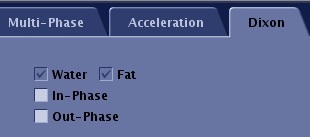
Figure 1. Dixon selection area of Details tab 
- All IDEAL prescriptions have Fat and Water automatically selected and therefore they cannot be de-selected.
- Click the
to open the Graphic Rx Toolbar. - Click SAT and select spatial saturation pulses in the desired locations.
- IDEAL is not compatible with chemical saturation but is compatible with spatial saturation.
- Type desired text in the Protocol Notes text area and click Save.
- Click Save Rx to add the IDEAL series.
- From the Workflow Manager menu, click Exam > Save as Protocol.
- To close the Protocol Edit session without saving the protocol, click End > Close from the Workflow Manager menu or the Protocol Session tab.
- Scan the IDEAL series.

