

- 00000018WIA30722970GYZ
- id_400238551.2
- Feb 10, 2022 5:15:41 PM
PROMO
PROMO is designed to reduce artifacts such as ghosting, blurring and ringing commonly seen with the acquisition of 3D images. 3D acquisitions are typically longer and thus more susceptible to patient motion.
PROMO is a prospective motion correction image technique. Motion is measured in real-time during the 3D scan by acquiring 3-plane spiral navigator data and processing the navigator data with a motion tracking algorithm. The position of the 3-plane navigator is determined automatically at the beginning of the scan. The 6 rigid motion parameters that are produced in real-time by the PROMO tracking algorithm are used to update the pulse sequence’s RF and gradient pulses to prospectively correct for the patient’s motion during the scan.
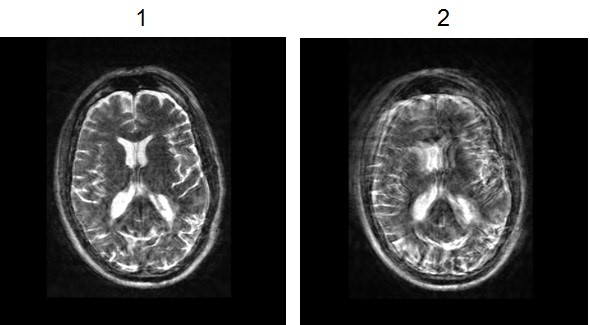
| Number | Description |
|---|---|
| 1 | Cube T2 axial reformatted image with PROMO turned On. |
| 2 | Cube T2 axial reformatted image with PROMO turned Off. |
Use PROMO to prospectively correct for patient motion when acquiring 3D images.
- PROMO is only available for brain scans with the following PSDs/Applications:
- Mode: 3D, Family: Fast Spin Echo, Pulse: CUBE
- Mode: 3D, Family: Fast Spin Echo, Pulse: CUBE T2 FLAIR
- Mode: 3D, Family: Fast Spin Echo, Pulse: Cube DIR
- Mode: 3D, Application: BRAVO
- Mode: 3D, Application: MP-RAGE
- PROMO is intended to correct for rigid motion in the brain. All other anatomical structures within the FOV that move in a non-rigid manner (e.g. jaw and neck) are not motion corrected.
- PROMO is optimized for pulsed motion. Continuous head motion (e.g., caused by heavy breathing, Parkinson's disease, etc.) can potentially result in re-scanning a large number of views and thus a much longer total scan time. Continuous head motion may also reduce the PROMO tracking accuracy which may result in residual motion artifacts in the final images. The time between the start of the scan and the end of the second TR is critical for motion tracking performance. Any motion during this period may reduce motion correction accuracy.
- PROMO is optimized to correct moderate motion (translation in less than 10 mm, rotation in less than 10 degree). Larger motion may cause residual motion artifacts in the final images. If large motion is detected during a scan, a warning message informs you that the image quality may be degraded. The message is displayed in the footer system status area. The use of padding is strongly recommended to constrain patient head motion during brain scans.
- Metal in the brain may degrade the navigator image quality and thus result in inaccurate motion tracking and correction.
- Abnormal brain structure and size (rounder head, large pathology, etc.) may reduce PROMO motion tracking accuracy, which may result in motion artifact in the final images. Motion correction efficiency of PROMO on pediatric patients is unknown.
- Extreme abnormal head position (e.g., head tilted up more than 30 degree) may cause a navigator position error and thus reduce the accuracy of motion tracker and correction. If the extreme abnormal head position is detected during scan, a warning message informs you to please re-position patient’s head for better PROMO image quality. The message is displayed in the footer system status area.
Figure 2. PROMO head position 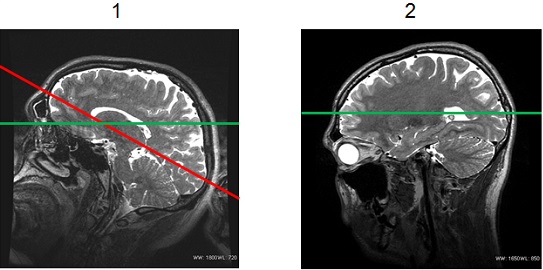
Table 2. Image legend Number Description 1 Poor patient positioning, with the chin tilted up too far. 2 Good patient positioning. - Annotation of the rescan time is displayed on the DICOM header.
Scan Parameters
- Maximum Rescan time scan parameter sets a limit to the total amount of rescan time allowed when there is excessive motion during the scan. Motion artifacts may occur if there was insufficient Rescan time to rescan all motion corrupted data.
- The following scan parameters may change slightly for the same scan prescription with and without PROMO. The change is due to the gradient requirements needed to achieve the motion correction.
- TE
- Cube echo spacing
- The scan time on the Scan Parameter menu bar, only reflects the prescribed scan time and does not include the rescan time. The prescribed PROMO scan time increases by approximately 8 seconds, in comparison to a scan without PROMO, due to the additional automatic navigator placement.
- When the normal scan is finished, the scan clock on the AutoView screen resets to the calculated rescan time. If motion is detected during the rescan period and the Maximum Rescan time has not been met, the scan clock is reset to account for the additional rescan time.
Graphic Rx
- Place the single slab over the center of the head. If the slab is placed too low or too high, it may result in sub-optimal navigator position, which reduces the accuracy of motion tracking and correction.
Figure 3. Example of a Graphic RX slab position for a PROMO scan 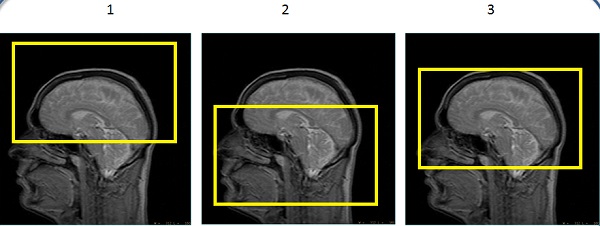
Table 3. Image legend Number Description 1 Slab positioned too high. 2 Slab positioned too low. 3 Good slab position.