

- 00000018WIA304A0970GYZ
- id_400236211.2
- Mar 2, 2022 4:30:00 PM
Motion Compensation
Motion Compensation with time course scans
Motion Compensation is used with cardiac time course scans. It is based on a non-rigid motion compensation algorithm that reduces inter-frame motion. It is used to correct for misalignment caused by motion between the different images of a series corresponding to a given geometrical location. The misalignments are typically caused by respiratory motion, but also residual cardiac motion (i.e., small variations from the average cardiac phase in the time course series). The visual assessment of the time-course defect as well as the semi-quantitative time-course measurement can be affected by misalignment between the different images of the time-course acquisition.
Patient considerations
For time course scans, Motion Compensation is most effective when the patient is free-breathing and there are no large variations in the patient's breathing pattern during the scan.
Motion Compensation time course image quality is compromised if:
- the patient has an irregular breathing pattern, for example, deep breaths interspersed with shallow breaths.
- the patient is instructed to hold the breath and if that fails and a large breath is taken in while the acquisition is still running.
- the motion is not in-plane, for example, it works best for sagittal an coronal scan planes.
- there is cardiac mis-triggering, arrhythmia or extra systole.
- the bolus appears in the 2nd half of the scan
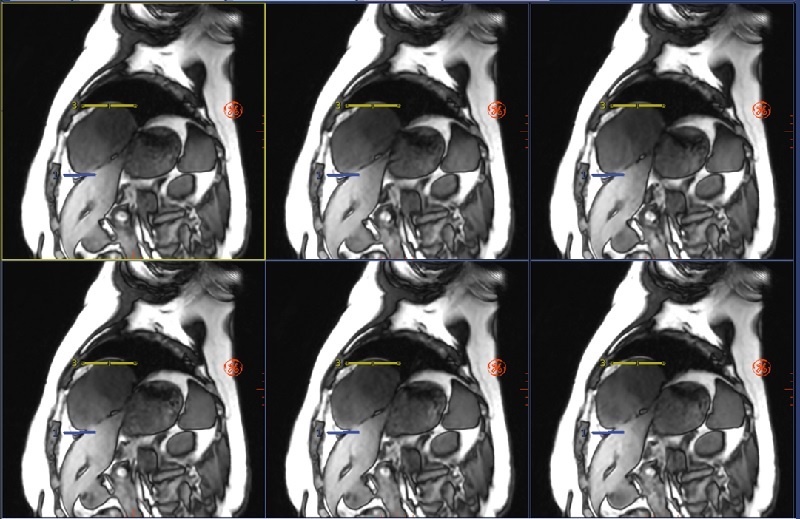
| Top/Bottom | Description |
|---|---|
| Top images Motion Compensation On |
Note how the heart is in the same position relative to the yellow/blue lines from one image to the next. |
| Bottom images Motion Compensation Off |
Note how the heart moves relative to the yellow/blue lines from one image to the next. |
Compatible time course pulse sequences
- Mode: 2D, Family: Gradient Echo, Pulse: Fast SPGR, Fast GRE or FIESTA, Imaging Options required with Motion Compensation:
- ARC or ASSET
- Cardiac Gating
- Extended Dynamic Range
- Multi-phase
- SR Prepared
Motion Compensation with T1MAP scans
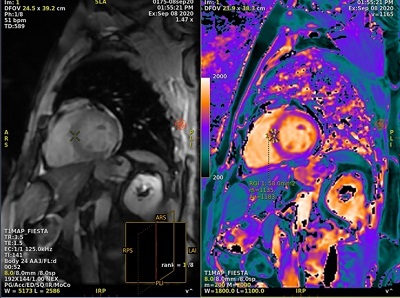
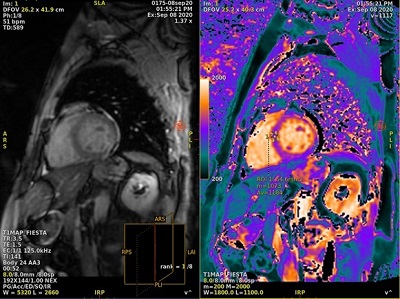
T1MAP with Motion Compensation scans provide better delineation of anterior and anteriolateral segments, which improves the accuracy of T1 estimates due to reduced motion artifacts.
Patient considerations
For T1MAP scans, Motion Compensation corrects for small residual respiratory motion which may still be present during a breath hold scan. Therefore, acquire T1MAP scans during breath hold.
Compatible one-click applications
- T1MAP-SPGR with Imaging Option Motion Compensation
- T1MAP-Fiesta with Imaging Option Motion Compensation
Image reconstruction considerations
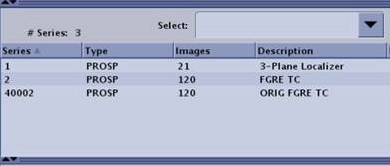
- The Motion Compensation preview images are displayed in AutoView while scanning but they are not stored in the Patient List. When displayed in AutoView, the series number is multiplied by 100. For example, if the original series is 2, the preview series, as displayed in AutoView, is 200.
Figure 5. AutoView series 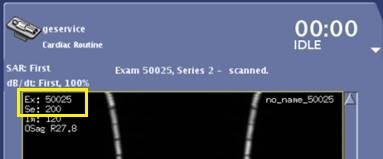
- For time course exams with Motion Compensation selected, the Save Original scan parameter is automatically selected. This results in non-Motion Compensation and non-filtered images to display in AutoView, thus providing immediate image quality feedback
- For T1 MAP exams, Motion Compensation is automatically selected; it cannot be turned off.
- If Save Original scan parameter is selected (turned On), then non-Motion Compensation and non-filtered images and Motion Compensation and filtered images are created.
- If Save Original scan parameter is de-selected (turned off), then Motion Compensation and filtered images are created.
- The
 in the screen footer area does not get updated until the Motion Compensation images are reconstructed.