

- 00000018WIA30DD7870GYZ
- id_400242471.5
- Aug 18, 2022 2:05:05 PM
HyperBand
HyperBand may not be for sale in all markets due to approval or clearance by in-country regulatory agencies.
Indications for use
HyperBand is a software option intended for use on GE MR 1.5T and 3.0T Systems. HyperBand consists of an acquisition and reconstruction technique allowing simultaneous excitation of multiple slices at multiple locations to accelerate imaging acquisition times or increase slice coverage without increasing scan time. HyperBand is indicated for echo-planar imaging (EPI) of the head and breast. HyperBand is indicated for imaging all patients not otherwise contraindicated for MRI examination.
Considerations
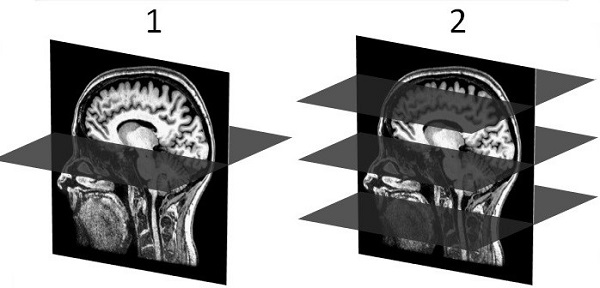
Use HyperBand with brain single and dual spin echo DWI, DTI and GRE EPI scans. HyperBand uses multi-band RF pulses to acquire multiple slices simultaneously to reduce scan time or increase slice coverage. Signals are received using a phased array coil. Parallel imaging reconstruction (ARC is used to un-aliase the simultaneously acquired slices. It is controlled through the Phase selection on the Acceleration tab. In addition, an inter-slice phase shift is added between simultaneously acquired slices to increase distance between aliased voxels as a way to reduce the g-factor penalty associated with HyperBand.
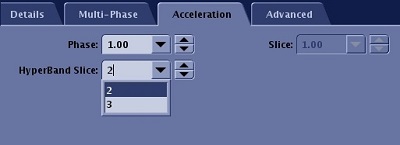
The number of HyperBand slices is set from the Acceleration tab.
Consider this information when selecting HyperBand.
- For GRE EPI PSD, when HyperBand Imaging Option is selected, you can also choose either Multi-phase. If you select Multi-phase, the following occurs:
- The maximum number of multi-phase time points is increased to 2048.
- The maximum number of multi-phase images is increased to 200,000.
- If you select fMRI, the following occurs:
- The maximum number of multi-phase time points is increased to 3000.
- The maximum number of multi-phase images is increased to 200,000.
- ART Imaging Option is allowed. For details, see Acoustic Reduction Technology considerations.
Figure 3. Imaging Option screen with GRE EPI PSD selected with HyperBand and Multi-Phase 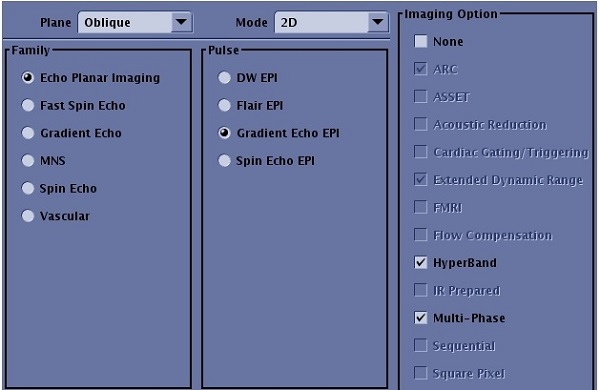
- When HyperBand and fMRI Imaging Options are selected with the GRE EPI PSD, the following occurs:
- BrainWave RT will run unless you select the 'research mode' paradigm in the fMRI tag in the UI. For details on the fMRI paradigm tag, see Paradigm introduction.
- Scan of next series is not allowed until all images are reconstructed, installed in the database and processed for fMRI. Some lags after acquisition may occur when selecting low TRs and high Hyper-Band factors.
- To avoid lags it is recommended to only use the fMRI option with the 48-channel coil and the following scan parameters:
- TR ≥ 2.5s, Matrix size ≥ 128x128, HyperBand factor <= 4
- TR ≥ 2s, Matrix size ≥ 96x96, HyperBand factor <= 4
- TR ≥ 1s. Matrix size ≥ 64x64
- ART Imaging Option is allowed. For details, see Acoustic Reduction Technology considerations.
Figure 4. Imaging Option screen with GRE EPI PSD selected with HyperBand and fMRI 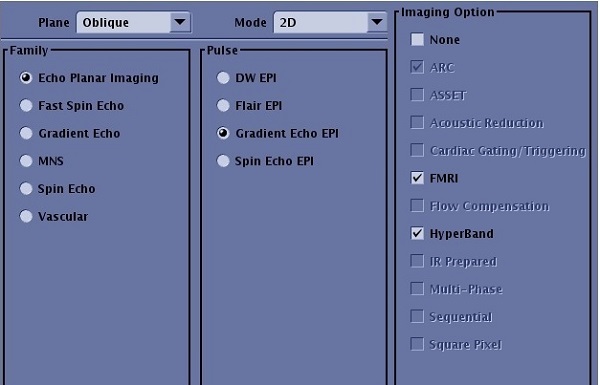
- HyperBand Slice factors available include:
- Clinical mode with the 48-channel coil allows up to a factor of 4.
- Clinical mode with HNU coil allows up to a factor of 2.
- An external calibration scan is needed for HyperBand to synthesis the calibration k-space data for the ARC reconstruction. If the calibration scan coverage is not big enough to cover the HyperBand scan area, aliasing artifact is observed. From the select On to acquire the calibration scan during Auto Prescan. For details, see Calibration scan procedure
- Classic Imaging Option is always on when HyperBand is selected. This helps the fat suppression.
- ARC and EDR Imaging Options are always On.
- TR (or scan time) reduction factor might be less than the HyperBand Slice factor due to peak B1 and SAR limitations.
- A minimum of 9 slices is needed for a scan prescription with HyperBand.
- HB is the Image annotation string that appears on the image and the abbreviation that appears on the scan control panel.
- X (HB), where X is the value chosen for HyperBand Slice on the scan Acceleration tab. It is added after the in-plane ARC acceleration factor on the series text page.
Figure 5. Series text page 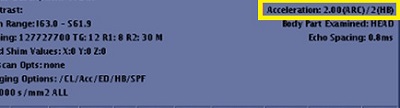
- An advisory warning is displayed if the distance between the two simultaneously excited slices is less than 30 mm. You can continue to use the protocol, but image quality might be degraded. Respond to any prompts that appear.
Research mode considerations
- Consider selecting a Reconstruction Level User CV with head scans. For details, see Recon Acceleration Level.
- Research mode allows up to a factor of 8 for all coils.