

- 00000018WIA30E60870GYZ
- id_400267581.10
- Jul 26, 2022 12:18:21 PM
About MR Scanner
About this task
- Specific energy limit exams are limited to 14,400 joules (4 W/kg for one hour (3600 s). After a suitable rest period (perhaps 2 hours) patient scanning may be resumed. A physician may override the specific energy limit for medical reasons.
- B1rms is the root mean square value of the radio frequency (RF) magnetic field for a given protocol. It is useful to determine how aggressive a protocol may be is terms of RF intensity.
- The About MR Scanner screen displays with safety information that may be useful for determining if MR Conditional requirements are met for certain implants and other devices. Available information includes:
- magnetic field strength (B0)
- maximum spatial gradient (rate of change with distance) of the static magnetic field
- nominal frequency range per nuclei
- maximum gradient output on cylinders with diameters of 0.2 m, 0.4 m, and bore diameter minus 0.1 m (for transverse magnets the “bore diameter” is the magnet gap).
For more details about technical specifications, see Technical specifications.
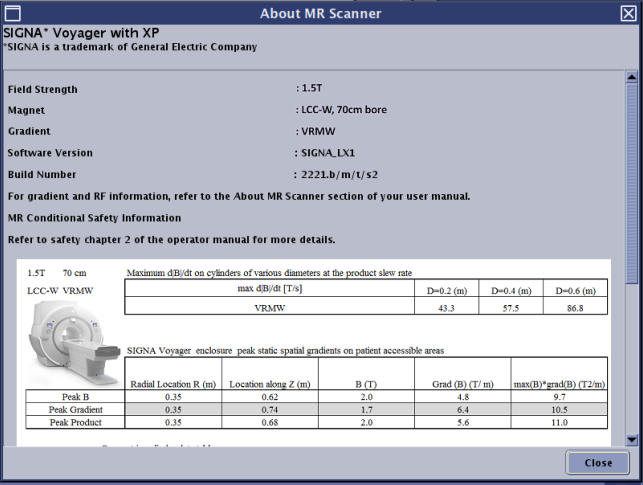
Use these steps to view the About MR Scanner screen, which provides details about your MR scanner. The contents of the screen varies based on your MR system.
Step-by-step instructions
- In the header area of the screen, click the Tools icon
 .
.