

- 00000018WIA30BF1970GYZ
- id_400270231.3
- Aug 18, 2022 1:51:15 PM
Flow Compensation
Use the Flow Compensation Imaging Option to reduce motion artifacts when slow-moving blood and CSF are flowing in the direction of the applied FC gradient. Flow Compensation makes blood and CSF brighter.
Flow Compensation increases the minimum TE, which in turn decreases T1-weighting when acquiring short TR/TE scans. Due to the increased TE and gradient use, the maximum number of slices allowed can decrease.
The flow must be moving in a direction that the FC gradient is applied:
- Spin Echo or GRE Echo: slice and frequency
- FSE: slice or frequency
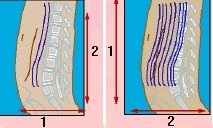
| Number | Description |
|---|---|
| 1 | Phase direction |
| 2 | Frequency direction |
Flow Compensation:
- is compatible with any 2D PSD except FIESTA or DWI
- is compatible with any 3D PSD except FGRE/FSPGR, FIESTA, TRICKS, and FIESTA-C
- is not compatible with spectroscopy PSDs
- uses a maximum of 2 echoes
- with FSE, requires the gradient selection on which FC will be applied
- with a sagittal or coronal scan should not swap phase and frequency (i.e., use the default selection). If the acquisition is FSE, place the FC gradient in the direction that the flow is moving; e.g., in the frequency direction for sagittal spines, and in the axial direction for axial spines