- 00000018WIA30391970GYZ
- id_400260851.2
- Feb 10, 2022 3:06:00 PM
Multi-phase: manual start
About this task
Use these steps to pause the scan process with a Multi-Phase series once the current phase is completed. When the current scan is completed and the phase delay time elapsed, the acquisition stops.
Step-by-step instructions
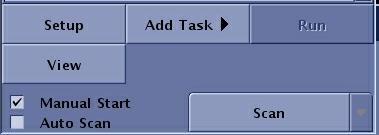
- From the Workflow Manager Scan/Task control panel, select Manual Start.
Figure 1. Manual Start on Workflow Manager area