

- 00000018WIA3084E870GYZ
- id_400240411.4
- Jun 20, 2022 3:49:00 PM
Navigator: tab and screens
Navigator enables you to perform a navigated, free-breathing, coronary artery or body imaging acquisition. It uses a navigator pulse that tracks the motion of the diaphragm. By placing the navigator tracker pulse over the right hemi-diaphragm, the acquisition is synchronized to the patient's breathing pattern and thus minimizes respiratory ghosting artifacts.
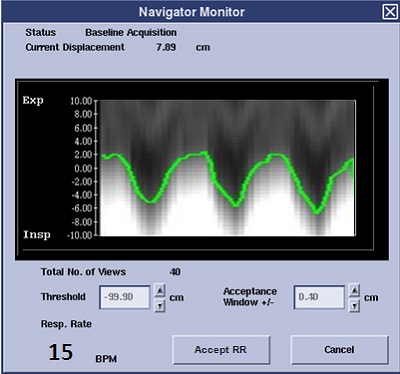
The Navigator acquisition interrogates the position of the right hemi-diaphragm prior to the data acquisition segment. If the position of the right hemi-diaphragm is within the acceptance window of the breathing pattern, then data acquisition is enabled. Otherwise, the segment repeats until an acceptable diaphragm position is found. The tracker waveform may be viewed during the acquisition to track the patient respiration and monitor whether it falls within the acquisition acceptance window and threshold level. The waveform can be viewed on the Navigator Monitor window when the navigator sequence begins. A baseline waveform is acquired first so the system has an idea of how the patient’s diaphragm is moving with respiration, represented as a graphed sinusoid wave.
Navigator allows patient free breathing, provides images with minimal motion artifact, and improves visualization through the following capabilities:
- A high SNR yield.
- Contiguous slices.
- Reformation of a single slab.
- Higher in-plane spatial resolution of coronary vessels than existing, conventional, breath-hold techniques.
- Greater flexibility in capturing the path of the coronary vessel with the 3D volume of data, allowing an increased tolerance for slice positioning inaccuracies.
- Higher resolution of liver and abdominal images in comparison to conventional breath-hold techniques.
- Respiratory rate measurement without the respiratory device attached to the patient.
Navigator tab
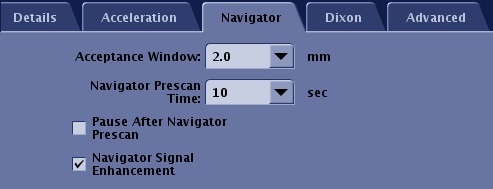
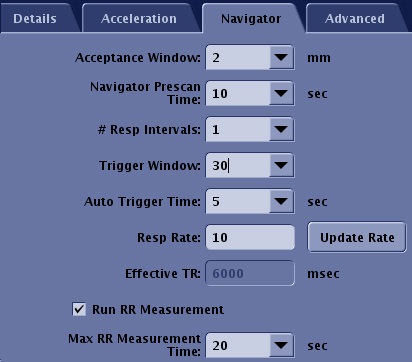
The Navigator tab only appears when Navigator is selected as an Imaging Option from the Imaging Options/PSD screen. The selections on the Navigator tab vary when cardiac is selected as an Imaging Option and also as the selected PSD changes.
| Parameter | Description |
|---|---|
| Acceptance Window | It is the range for data acquisition. Image data is only acquired when the signal is detected within this range. Enter a value in the Acceptance Window text box or click the up and down arrows to change the acceptance window in real time. It defaults to ±2 mm. The minimum step size is ±0.5 cm and the maximum is ±10 cm. This allows for any drifts in the baseline of the respiratory cycle during the scan acquisition and/or the flexibility to increase or decrease the total scan time. |
| Navigator prescan time | The value decides the duration of Navigator Prescan. A shorter prescan time decreases the total scan time, but it may inaccurately set the threshold. |
| Maximum Navigator Interval | The interval between Navigator pulses doesn’t exceed this value. A shorter value improves time resolution of motion detection at the expense of increased scan time. This option is only available with LAVA scans. |
| Slab Tracking | It turns on a rigid motion correction process for Navigator Gating and Inhance 3D Inflow IR scans. |
| Pause After Navigator Prescan | This option allows you to control the start of the scan so that you can deliver breathing instructions. It is only available with Navigator Gating. |
| Navigator Signal Enhancement | This option is typically selected to improve the stability of the navigator signal when the navigator signal SNR is low. The SNR of the image is also effected. The tradeoff is an increased scan time. It is only available with Navigator Gating. |
| # of Respiratory Intervals | This option determines the pulse sequence repetition time, or Effective TR. One respiratory cycle is the time from one maximum inspiration to the next maximum inspiration.
|
| Trigger Window | This option is the ratio between one respiratory cycle and a period from the end of the data acquisition window to the beginning of the next data acquisition window. It is the time set aside to stop data collection and allow for variations in the breathing pattern.
|
| Auto Trigger Time | It sets a time limit for when the system will trigger the next data acquisition point even if the green line stays within the acceptance window. It is effective to reduce scan time if the patient sleeps. It is available in Navigator Triggering. 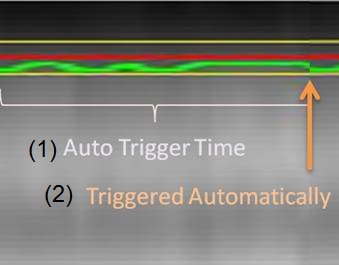 |
| Respiratory Rate | This is the number of respiratory cycles per minute.
|
| Update Rate | This buttons acquires an update of the patient's current respiratory rate in breaths per minute and displays the value in the Resp Rate text box.
|
| Effective TR | It is the estimated repetition time calculated from the given Respiratory Rate and the # of Respiratory Intervals. It is calculated as (60 sec ÷ respiratory rate) × (number of respiratory interval) . For Inhance IFIR, it is calculated as (60 sec ÷ respiratory rate). |
| Run RR Measurement | This option measures the respiratory rate using navigator pulses even if the respiratory bellow is not attached. It is useful to estimate scan time and scan parameters such as maximum number of slices. When the respiratory device is attached, it is not necessary to select RR measurement. The Respiratory Rate value derived from the device is applied when you click Update Rate, even after RR Measurement is scanned. That is because the result of the respiratory device can represent the respiratory cycle in real-time. |
| Maximum RR Measurement Time | This value determines the maximum duration of RR Measurement. RR measurement finishes automatically in this time if you do not click Accept RR. Note: The data acquisition can be stopped anytime by Accept RR button on Navigator Monitor window once the respiratory rate becomes stable. |
Navigator Monitor screen
The Navigator Monitor window opens when the navigator sequence starts scanning. This window remains open for the entire scan. Click Done to close it and click Navigator at the bottom of the Scan Operations area to re-open it.
When the Navigator Monitor window opens, it takes the system time to obtain a baseline as the patient’s breathing and diaphragm movements are monitored. The time during which the baseline data is gathered can be as long as 30 to 45 seconds. For a patient with an erratic heart rate or an unusual breathing pattern, this baseline time may be longer.
| Parameter | Description |
|---|---|
| Tracker trace | The Tracker trace represents the tracker position as the patient is breathing. If the tracker is outside the threshold area (the yellow lines), the data is not used in reconstruction. If the tracker is inside the yellow lines (shown by a blue dot at the base of the trace), then the data is used for reconstruction. |
| Status | Status displays information about the current status of the monitor function in progress, providing four specific pieces of information at various times throughout the scan:
|
| Current Displacement | Current Displacement displays the respiratory phase in centimeters. This is calculated after the initial prescan and is updated if you change it. |
| Total # of Views | Total # of Views indicates the number of views needed to complete the data acquisition. |
| Efficiency | Efficiency indicates how often the detected triggers are used for data acquisition. Higher efficiency means you are making good use of all the detected triggers and scan time is improved, but it is not necessarily an indicator of image quality. This depends on the acceptance window and where the data is being acquired in respect to the respiratory cycle. |
| Threshold | Enter a value in the Threshold text box or click the up and down arrows to change the threshold in steps of 1 cm. The step size is absolute, so if the Navigator autoscales, the perceived displacement of the threshold bar is smaller. |
| Acceptance Window | It is the range for data acquisition. Image data is only acquired when the signal is detected within this range. Enter a value in the Acceptance Window text box or click the up and down arrows to change the acceptance window in real time. It defaults to ±2 mm. The minimum step size is ±0.5 cm and the maximum is ±10 cm. This allows for any drifts in the baseline of the respiratory cycle during the scan acquisition and/or the flexibility to increase or decrease the total scan time. |
| Auto Scale | Auto Scale re-scales the display to accommodate major changes in a patient's breathing; i.e., the patient’s breathing began labored and shallow, but now the patient has relaxed and breathing has slowed. Sometimes, setting the threshold does not compensate for this and re-scaling the display helps you set the proper threshold and acceptance window. |
| Accept RR | This button only appears if Maximum RR Measurement Time is selected from the Navigator tab. |