

- 00000018WIA309A1970GYZ
- id_400227611.6
- Aug 17, 2022 6:18:44 PM
Silent: acquire a PROPELLER scan
Before you begin
This topic applies to the PROPELLER Silent Neuro Package and Silent Suite PROPELLER (Quiet).
T2, T2 FLAIR PROPELLER, T1, T1 FLAIR PROPELLER, and PROPELLER for extremities applications have been re-designed to substantially reduce acoustic noise.
Scans acquired with the Silent Neuro Package make less acoustic noise than in regular operation mode. This may help patients who are sensitive to loud noises in being comfortable during an MR scan. Since the scans use PROPELLER technology, they tend to be motion robust.
About this task
The patient is positioned for a head exam or an extremity scan and a scan session is open on a system that has the Silent Package.
Step-by-step instructions
- Adjust other scan parameters as needed.
- For optimum scan time and performance, the axial or oblique axial plane is recommended. Sagittal and coronal scan planes are compatible, but may result in longer scan times.
- It is recommended to not select PURE as a prospective filter since it increases the acoustic noise of the calibration scan and increases the scan time. If desired, add PURE as a post-acquisition filter from ClariView.
- Compared to standard T2 and T2 FLAIR PROPELLER applications, images acquired with the Silent Neuro Package may result in reduced SNR and longer scan time. It is recommended to use a post-processing Filter Setting (for example, A, B, C, etc.) to compensate for the potential reduction in SNR.
- The recommend bandwidth is 25 to 42 kHz to achieve minimum echo spacing, which helps to reduce blurring.
- The recommend ETL value is 16 to 20 to achieve similar contrast to standard applications. Note that the GE PROPELLER Brain T2 and T2 FLAIR protocols are optimized for clinical scanning.
Figure 1. PROPELLER image comparison 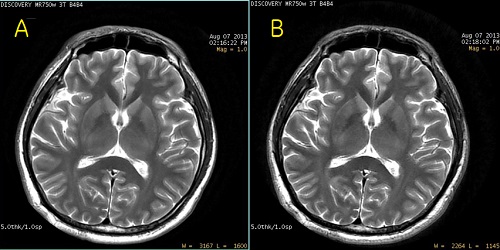
Table 1. Image legend Number Description A Traditional PROPELLER image. B PROPELLER image acquired with the Silent Scan package. - Select User CVs as needed.