About this task
Use these steps to magnify/minify the images. The selection affects all viewports.Step-by-step instructions
- Click the
 .
. - Place the cursor in a viewport and right-click to view the right-click menu.
- Click Zoom to view the Zoom menu.
Figure 1. Zoom menu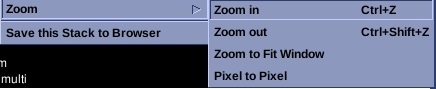
- Click Zoom in and click and drag the cursor to magnify the image in increments.
- Click Zoom out and click and drag the cursor to minify the image in increments.
- Click Zoom to Filt Window to magnify the images to fill each viewport.
- Click Pixel to Pixel to sets the zoom factor so that one pixel in the data corresponds to one pixel on the screen.

