
• Object ID: 00000018WIA30240970GYZ
  • Topic ID: id_40025266 Version: 1.4
  • Date: Mar 24, 2022 5:14:44 PM

COSMIC

About this task

COSMIC employs a fully-balanced, oscillatory-state, coherent-imaging pulse sequence with segmented multi-shot centric k-space acquisition technique. The center of k-space that contributes to image contrast is filled during the oscillatory state.

COSMIC images have improved disc, muscle, bony structure and grey/white matter contrast, and higher SNR in comparison to 3D FIESTA images given similar scan parameters for a C-spine scan. It also reduces distortion due to susceptibility or chemical shift in comparison to GRE and FIESTA pulse sequences.

Use these steps to acquire 3D axial C-spine images. The k-space filling technique used with COSMIC improves the CNR and SNR of C-spine tissue, including the spinal cord, vertebral disks, nerve root canal, and contrast between CSF and nerve roots. 3D COSMIC images improve depiction of osteophytes and foraminal nerve roots. It produces a mixed T2, T2/T1 image contrast.
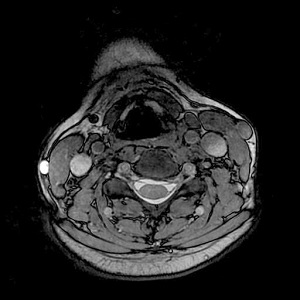
Figure 1. COSMIC axial C-spine

Step-by-step instructions

  1. Start a scan session.
    Spine phased array coils are compatible with COSMIC.
  2. Acquire a 3-Plane localizer.
  3. From the Workflow Manager, click Add Task > Add Sequence.
  4. From the Protocol screen, select a COSMIC protocol from your site or GE library.
    • At a minimum, include a localizer and a COSMIC series.
    • If you cannot locate a COSMIC protocol in either library, then from the Protocol screen:
      1. From the GE protocol library, click the Template tab.
      2. Click the Applications folder.
      3. From the Applications list, click COSMIC and add it to the Multi-Protocol Basket.
      4. Click Accept.
  5. From the Workflow Manager, select the COSMIC series and click Setup.
    1. Make scan parameter adjustments, as needed.
      If any or all of these scan parameters are selected (ASSET, HyperBand, PURE), and if you select On from the Calibration in Prescan menu, which is located on the Details tab, a calibration scan is acquired during Auto Prescan.
    2. To avoid banding artifact, adjust scan parameters until TR < 4 to 5 ms. Note that TR cannot be directly edited.
    3. Verify that the slab thickness is 24 cm or less.
    4. Graphically deposit and position a single slab over the entire C-spine. COSMIC only allows a single-slab.
    5. To minimize swallowing motion-related artifact, place an anterior SAT pulse that covers anatomy anterior to the vertebral column, including the esophagus.
    6. If fat suppression is desired, select the appropriate Chem SAT option.
    7. Click the Advanced tab and make adjustments as needed.
  6. If desired, see Add post-process task. Compatible post-process tasks include:
    • Maximum Intensity Projection
    • Multi Planar Reconstruction
    • Image Enhancement Filters
  7. When the prescription is finished, click Save Rx > Scan.