

- 00000018WIA3015E870GYZ
- id_400221071.4
- Aug 21, 2022 7:12:04 PM
Apodization Level
Use the Apodization Level User CV to reduce Gibbs ring-like artifact with a tradeoff of reduced image sharpness, with these PSD/Applications.
Note: Apodization level is not applied when AIRTM Recon DL is turned on.
| PSD/Application | Mode | Family | Pulse |
|---|---|---|---|
| 2D FSE | 2D | Fast Spin Echo | DW PROPELLER FSE PROPELLER |
| Cube | 3D | Fast Spin Echo | Cube, Cube T2 FLAIR pulse Extended Dynamic Range, IR Prepared Imaging Options |
| 3D FSE | 3D | Fast Spin Echo | FSE |
| Spin Echo | 2D | Spin Echo | Spin Echo |
| 2D/3D MERGE | 2D, 3D | Gradient Echo | MERGE |
| 2D FIESTA | 2D | Gradient Echo | Fiesta |
| BRAVO, DISCO, /MP-RAGE one-click applications | N/A | N/A | N/A |
There are three options:
- 0 = Weak, for the sharpest image with the most Gibbs artifact.
- 1 = Medium, image sharpness and Gibbs artifact in between Weak and Strong options.
- 2 = Strong, for the least sharp image with the least Gibbs artifact.
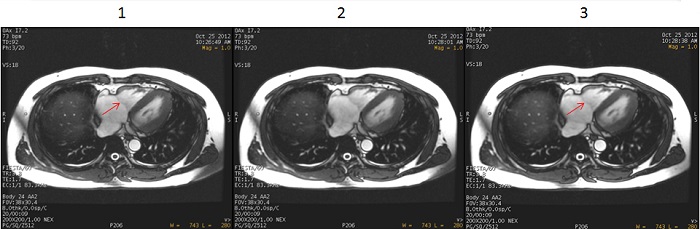
| Number | Description |
|---|---|
| 1 | Apodization Level set to 0 = Weak. |
| 2 | Apodization Level set to 1 = Medium. |
| 3 | Apodization Level set to 2 = Strong. |