

- 00000018WIA30CA1970GYZ
- id_400216471.3
- Mar 30, 2022 3:07:19 PM
AIR Recon
Use the AIR Recon User CV with Silent PROPELLER scans with the Imaging Option ART (Acoustic Reduction Technology) mode set to High. There are two AIR Recon options:
- 0 = OFF
- 1 = ON
Set the CV to OFF to have the lowest acoustic noise level. This results in no calibration scan acquired during Prescan and AIR™ Recon is turned off.
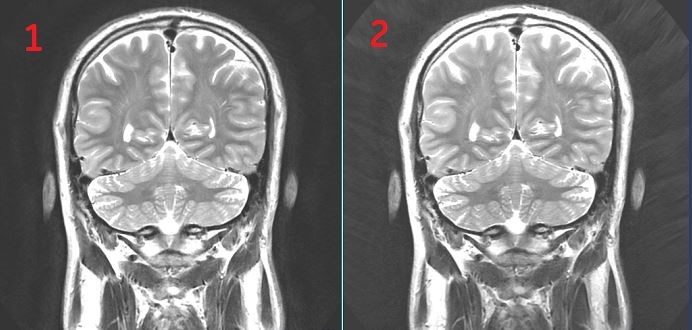
Set the CV to ON for improved image quality: better uniformity, reduced streaking artifact, darker background. This results in a calibration run in Prescan and AIR™ Recon is turned on. This calibration scan is much quieter than the regular calibration scan, but it is still louder than the Silent PROPELLER scan.
| Number | Description |
|---|---|
| 1 | AIR Recon turned ON. Note the improved image quality |
| 2 | AIR Recon turned OFF. |