

- 00000018WIA30FED590GYZ
- id_20365441.1
- Jun 25, 2022 11:45:53 AM
Slice Uniformity
Use Slice Uniformity to reduce the slice-to-slice signal variation in 2D FSE or Spin Echo images.
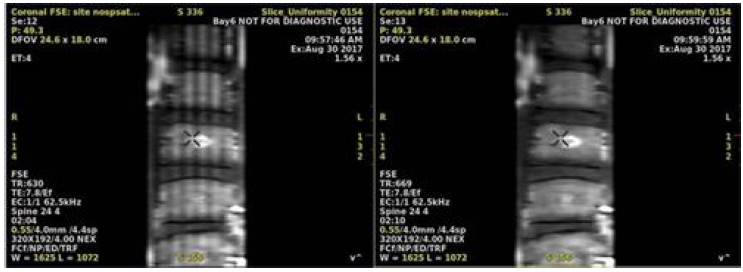
| Number | Description |
|---|---|
| Left | Image on the left is the reformat image with Slice Uniformity turned Off . |
| Right | Image on the right is the reformat image with Slice Uniformity turned On. |
- Off = 0
- On = 1 (default)
- Only takes effect for one acquisition scan.
- Works well when the slice number is away from the maximum slice number.
- May reduce the maximum number of slices.
- When used with Spin Echo:
- it is no available with Inversion Recovery, a Spin Echo family PSD
- it is not available when Imaging Options Cardiac Gating or Respiratory Compensation are turned on
- When using with 2D FSE:
- It is not available with following image options: Blood Suppression, Cardiac Gating/Triggering, Flex, IDEAL, Navigator, Respiratory Gating/Triggering, T2 FLAIR and VERSE
- If the T1 Flair Imaging Option is not selected, Slice Uniformity is not available when CV6 (Sequential Group) is turned on or when CV7 (Blurring Cancellation) is turned on.
- If the T1 Flair Imaging Option is selected, Slice Uniformity is not available when CV23 (Legacy T1 Flair) is turned on.