

- 00000018WIA30014970GYZ
- id_400240711.2
- Mar 16, 2022 2:12:44 PM
NEX Mode
Use NEX Mode when the NEX value is greater than or equal to 2 for the following scans:
- LAVA (mode: 3D, Family: Gradient Echo, Pulse: LAVA
- Application: LAVA-Flex
There are two NEX Mode options. Note that the scan time is the same for both options.
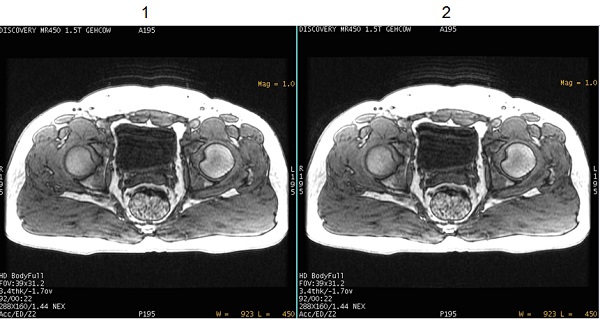
- Long term = 1, which acquires data first in an phase loop and then in an excitation loop. This data acquisition technique can reduce ghost-like artifacts induced from patient motion.
- Short term = 0, which acquires data first in an excitation loop and then in a phase loop. This is how data is acquired in previous software versions. Typically use this option if your site has an on-going clinical study with LAVA or LAVA-Flex images and you do not want to change any scan parameters or User CVs that would effect image appearance.
| Number | Description |
|---|---|
| 1 | Image acquired with NEX Mode User CV set to 1 or Long term. Note the reduced motion artifact. |
| 2 | Image acquired with NEX Mode User CV set to 0 or Short term. |