

- 00000018WIA30044970GYZ
- id_400256621.3
- Aug 28, 2022 2:25:11 PM
Chemical Shift Reduction
Use Chemical Shift Reduction to reduce the chemical shift ghosting near the fat/water interface with the following scan parameters:
- Mode: 3D
- Family: Gradient Echo
- Pulse: Fast SPGR
- Type-in field: 3dradial
- Imaging Options: Turn off the following options:
- Bright Blood
- IR Prepared
- Respiratory Gating
- , select None
- User CV Chemical Shift Reduction = On
There are two options:
- 0 = OFF, which is the default
- 1 = ON, select if chemical shift artifact is a concern
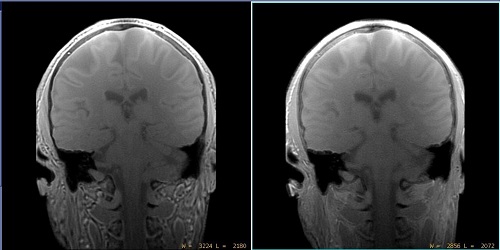
| Side | Description |
|---|---|
| Left | Chemical Shift Reduction turned off. |
| Right | Chemical Shift Reduction turned on. |
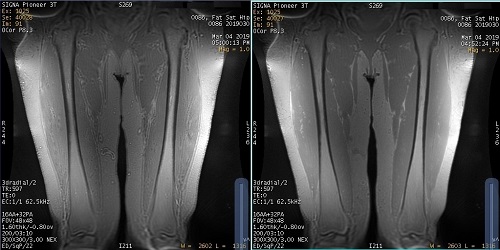
| Number | Description |
|---|---|
| Left | Chemical Shift Reduction turned off. |
| Right | Chemical Shift Reduction turned on. Note the reduced chemical shift artifact. |
Considerations
- For water dominant anatomies such as the brain, turning on Chemical Shift Reduction results in more blurriness.
- For fat and water mixed anatomies such as the neck and extremities, turning on Chemical Shift Reduction can dramatically reduce the ghosting artifact.
- Recommended for use with musculoskeletal scans and not for brain scans.