Any transmit/recieve or receive only extremity coil can be used with T2MAP cartigram.
Select a T2 Map protocol from your site or GE library.
From the Workflow Manager, click Setup and make protocol adjustments, as needed.
Typically select the following scan planes:
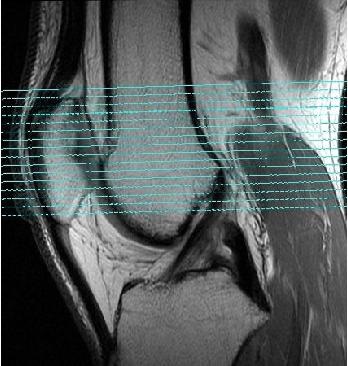
Axial - Patellofemoral Joint
Sagittal - Femoral Condyle
Coronal - Tibial Plateau
If slice spacing is less than 20% of the slice thickness and if the TR prescribed can accommodate the prescribed slices in a single acquisition, the system will automatically change the prescription to two acquisitions in order to reduce the cross talk effects.
The TE is the primary scan parameter that controls T2 weighting. It is not a selectable parameter with the T2MAP application.
Click the Advanced tab and select User CV values, if needed.
Prescribe Graphic Rx and SAT, as appropriate. Due to the T2MAP scan time length, typically only scan in the area of interest, for example 5 slices in the post-surgical area.
Figure 1. Standard axial slice prescription off a sagittal image