

- 00000018WIA3019BB80GYZ
- id_20356961.6
- Mar 24, 2022 5:18:21 PM
3DCINE-SPGR and FIESTA
About this task
Use these steps to acquire cardiac gated segmented scans to obtain volumetric cine images in a single breath hold. 3DCINE acquisitions can be planned in any dimension. They allow for velocity encoding in all directions to assess vascular flow. The short-axis, whole-ventricular cine images are used to measure cardiac ventricular volumes at different cardiac phases and calculate ejection fraction for assessment of cardiac functionality.
- Use 3DCINE-FIESTA Fiesta for non contrast scans.
- Use 3DCINE- SGPR for contrast exams.
Step-by-step instructions
- Follow these steps to acquire a 2D FIESTA CINE images.
- From the Workflow Manager, select a 2D FIESTA CINE AST series and click Setup.
- On the axial or axial-oblique localizer, prescribe a vertical long-axis scan plane of the right chambers.
Figure 1. Example of slice position 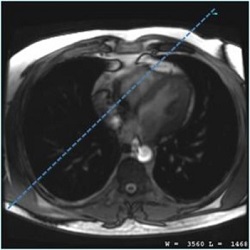
- Place a shim volume that covers the heart. For details, see Shim volume.
- Click Scan and provide breathold instructions.
- From the scan parameters screen, make adjustments as needed. It is recommended you use the GE protocol.
- Imaging Options that are automatically On and cannot be de-selected:
- ARC
- Cardiac Gating/Triggering
- Extended Dynamic Range
- ZIP x 512 for 3DCINE-FIESTA and 3DCINE-SPGR
- Always select TE Minimum, which reduces the TR so that temporal resolution is improved and overall IQ benefits from the shortest possible TR.
- For optimum image quality, set the 3DCINE-FIESTA flip angle to:
- 60 degrees at 1.5T
- For optimum image quality, set the 3DCINE-SPGR flip angle to 20 degrees.
- Or optimum image quality, select a bandwidth, .
- 3DCINE-FIESTA = 125kHz, which produces the shortest possible TR.
- 3DCINE-SPGR = 62.5kHz, which decrease temporal resolution with a tradeoff of increased TR increases.
- Increasing bandwidth, decreases SNR.
- Maintain a pixel size of less than 2x2 mm in-plane resolution.
- Adjust FOV size to the patient, and make sure that it is rotated so that the phase encoding direction is aligned with the short dimension of the anatomy to minimize phase FOV.
Figure 2. Example of correct FOV rotation 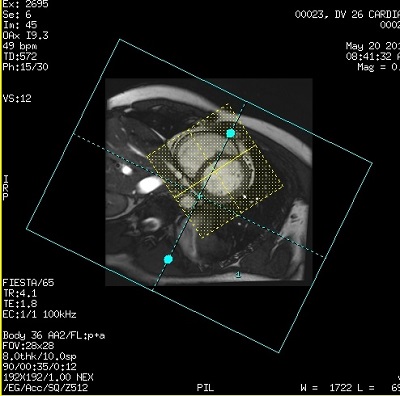
Figure 3. Example of wrong FOV rotation 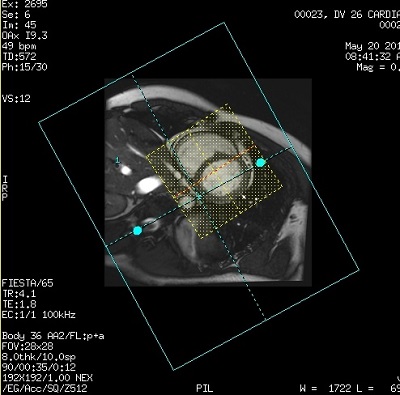
- Imaging Options that are automatically On and cannot be de-selected:
Results
Post-processing
Cardiac VX can be used to post-process the 3DCINE images. It does not automatically open the Function module when the 3DCINE data set is opened with Cardiac VX. You must select Function from the Mode menu, located in the top left corner of Cardiac VX application screen.
Image annotation
For details, see Application annotation.
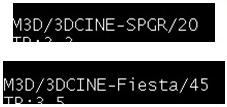
The annotation field for the PSD name is:
- 3DCINE-SPGR/XX where XX is the flip angle
- 3DCINE-Fiesta/XX where XX is the flip angle
DICOM header information about heart cycle
- The heart rate and nominal interval DICOM tags (0018,1088 and 0018,1062) show the mean heart rate/nominal interval during the scan.
- Additionally, the minimum RR interval, the maximum RR interval, the number of rejected segments due to detected arrhythmia, and the total number of acquired segments during the scan, also are included in the DICOM header (Tags: 0018,1081- 0018,1082- 0018, 1084- 0018,1083, respectively).