

- 00000018WIA306B0970GYZ
- id_400227641.6
- May 26, 2022 12:23:47 AM
TRICKS
About this task
Elliptic Centric-TRICKS is a modified 3D Fast GRE pulse sequence that produces:
- CEMRA high spatial and temporal resolution images
- A mask acquisition used to produce automatically subtracted source images
- Collapsed images from each temporal output phase
TRICKS high temporal resolution is achieved by dividing the 3D k-space into a number of segments from the center of k-space out (A to D in illustration below). Views are acquired in elliptic centric order and the rate of sampling is varied such that the center of k-space is sampled more often than the outer regions. When the center of k-space is sampled more frequently than other regions, the time period from one phase to the next is shortened. The end result is that the contrast kinetics/flow is subdivided into more phases with TRICKS than with other PSDs and, therefore, the temporal resolution is shorter than other PSDs.
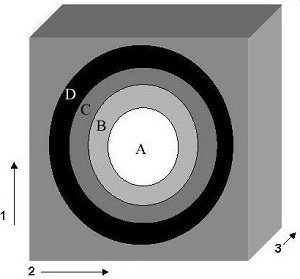
| Number | Description |
|---|---|
| 1 | Ky |
| 2 | Kz |
| 3 | Kx |
Use these steps to acquire TRICKS images. TRICKS has simultaneous acquisition and reconstruction of images. It acquires a mask acquisition and as many phases as defined in the prescription. A collapsed image for each phase is reconstructed into a single series. In addition, the automated complex subtracted source data for each station is reconstructed and placed in a separate series.
Step-by-step instructions
- From the Workflow Manager area, select the TRICKS series and click Setup.
- Adjust these scan parameters to capture the desired blood flow dynamics (healthy and diseased) of the anatomy you are scanning: TE, Bandwidth, number of Scan Locs, Matrix (primarily Phase), NEX, Phase FOV, and the number of Temporal Output Phases (this only affects the Rx Scan Time and has no effect on Temp Res time). Adjust the values so that the Rx Scan Time is long enough (e.g., long enough to capture venous phase) and the Temporal Resolution time is short enough to capture, at a minimum, one arterial pass.
- If any or all of these scan parameters are selected (ASSET, HyperBand, PURE), and if you select On from the Calibration in Prescan menu, which is located on the Details tab, a calibration scan is acquired during Auto Prescan.
- The Rx Scan Time (contrast enhanced phases), mask scan time, and temporal resolution (time interval from one phase to the next phase) values are displayed on the Scan Parameter screen.
Figure 2. TRICKS scan parameter screen bar that displays scan time and temporal resolution 
- Click the TRICKS tab and make adjustments as needed.
Figure 3. TRICKS tab 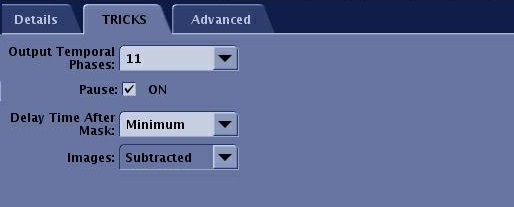
- Adjust the Output Temporal Phases to achieve a total scan time that allows you to capture the desired circulation phases: arterial, venous, or both. Typical values range from 12 to 15. As the number of Scan Locations increases, the allowed number of Output Temporal Phases decreases. The maximum value is 56.
- Pause On: the system stops after the Mask scan. You must press Start Scan on the keyboard to begin the scan. The scan begins after the programmed delay time after the Mask series is complete.
- Pause Off: The system pauses after the Mask scan is completed and then resumes scanning after the programmed Delay time after Mask has elapsed.
- Delay After Mask allows you to program an automatic delay time after the Mask series is complete if you selected a pause. Typical values are Min to 30 seconds.
- Images menu: TRICKS prescription can acquire subtracted, un-subtracted or both un-subtracted and subtracted images. This may provide additional information in areas where patient motion between the mask image and contrast images degrade image quality or where bony landmarks are required for surgical planning.
Results
Viewer
View the TRICKS images in the Viewer. From both viewers, a collapsed image for each phase is put in the series; in this example series 200. The source images are put into individual series, one for each phase; in this example, series 2 (mask) and 201-209 (subtracted source images).
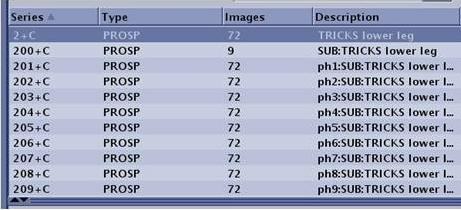
Image annotation
The collapsed images are annotated as COL, scan plane, slice location, and +C (e.g: COL Ax S19.0+C).
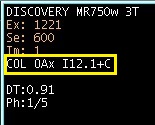
The subtracted images are annotated as SUB scan plane, slice location, and +C (e.g: Sub Ax S19.0+C).

Both collapsed and subtracted images are annotated with the TD and the current phase/total number of phases (e.g., TD: 1000, Ph: 1/8). The TD is the time the phase started from the time the Scan button was pressed.