• Object ID: 00000018WIA3099C770GYZ
  • Topic ID: id_40025577 Version: 1.5
  • Date: Jun 27, 2022 1:14:57 PM

SmartPrep: acquire the scan

About this task

Use these steps to acquire a SmartPrep series to use a tracking pulse to synchronize image acquisition with the arrival of a contrast bolus to acquire vascular images.

Step-by-step instructions

  1. Click Save Rx.
  2. Select the Scan arrow icon and click Auto Prescan > Scan.

    Result

    Auto Prescan performs the prescan procedure without using previous data.
  3. Watch the message area. Do not inject until you see the "Begin Contrast Injection" message.
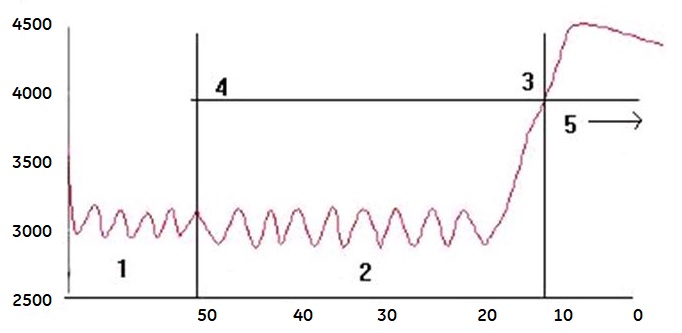
    Figure 1. SmartPrep scan time frame
    Table 1. SmartPrep image legend
    NumberDescription
    1Acquire Baseline
    2Begin Contrast Injection
    3Bolus Detected (give patient breathing instructions)
    4Threshold
    5Scan, the vertical axis = signal intensity, the horizontal axis = time in seconds
  4. Instruct the patient to stop breathing when the message "Bolus Detected" displays and the gradients become silent.
    • The gradients are active up until this point (or the maximum monitor period has been reached).
    • The quiet delay time allows you to more easily give the patient breathing instructions.
  5. Allow the scan to complete and instruct the patient to resume breathing.