- 00000018WIA3065B770GYZ
- id_400252931.4
- Aug 16, 2022 5:40:37 PM
Prescribe a chemical SAT pulse
About this task
Chemical SATuration (SAT) Pulse suppresses the signal from either fat or water. Chemical saturation delivers RF pulses within the FOV at a specific frequency to saturate and eliminate unwanted signal from selected compounds.
Use Chemical SAT to reduce the signal from competing tissue and to increase the conspicuity of pathology. Chemical SAT techniques are useful to suppress fat or water in your images, such as:
- Suppressing fat in abdominal studies to reduce anterior abdominal wall breathing artifacts
- Identifying fatty infiltrate in the liver
- Demonstrating musculoskeletal tumors when used with contrast agents
- Dramatically reducing chemical shift artifacts
- Identifying fat by its dark appearance in fat-suppressed images
- Using chemical saturation to reduce chemical shift artifacts
- Using chemical saturation to identify fat or fatty structures by its low signal intensity
Use these steps to prescribe a chemical SAT pulse on a scan.
Step-by-step instructions
- From the Chem SAT menu, select a saturation pulse.
Figure 1. Chemical SAT menu 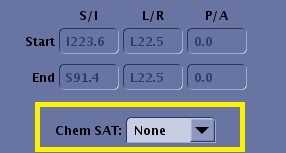
- Consider the following prescan tips.
Chemical SAT type Prescan tips Fat During Auto Prescan, the system selects the appropriate center frequency based on your choice. If Fat SAT is chosen, for example, water is the required center frequency for Auto Prescan. The system then determines two peaks, fat and water, and centers on water. It then centers the narrow SAT pulse at the appropriate frequency on the spectrum. Fat SAT alters the flip angle based on all of the prescription parameters to improve and give a more uniform tissue saturation. Fat SAT has been optimized to make fat appear very dark. If you prefer less saturation, select Fat Classic
Figure 2. Fat SAT provides an optimized fat saturation pulse (1) based on the selected TE and TR values. 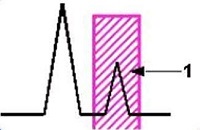
Fat Classic In the classic version of Fat SAT, the saturation flip angle is set at a fixed value. This fixed flip angle is not always optimal when considering multiple fat components, number of slices acquired, and other parameters such as the pulse sequence, TE, and TR. If the suppression of fat seems insufficient, use Fat Sat. Water During Auto Prescan, the system selects the appropriate center frequency based on your choice. If Water SAT is chosen, for example, fat is the required center frequency for Auto Prescan. The system then determines two peaks, fat and water, and centers on fat. It then centers the narrow SAT pulse at the appropriate frequency on the spectrum. Figure 3. Water SAT provides an optimized water saturation pulse (2) based on the selected TE and TR values. 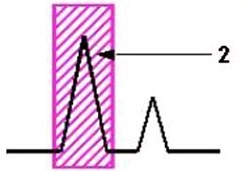
SPECIAL SPECtral Inversion At Lipids (SPECIAL) uses an inversion pulse transmitted at the frequency of fat and timed to the null point of fat. This results in a signal produced from protons bound in water and a decreased signal from nuclei precessing at the frequency of fat. The fat spectral sensitive pulse is applied once per set of slice encodings. There is a slight increase in scan time to account for the inversion pulse. This increase in scan time is much shorter than the increase that would occur if a Fat SAT pulse was used. The inversion pulse is considered a "smart" technique because it optimizes the inversion pulse flip angle based on the prescribed TI, TR, and flip angle.
Use SPECIAL to suppress fat with a small increase in acquisition time.
Figure 4. Inversion pulse transmitted at the frequency of fat: Water (1), Fat (2) 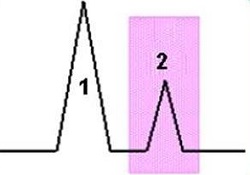
Figure 5. Inversion pulse (1) timed to the null point of fat (2) 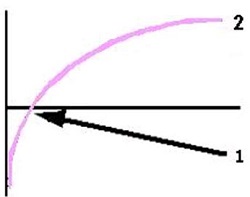
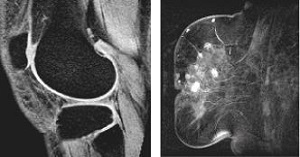
Figure 6. Knee on left and breast on right with SPECIAL fat suppression