- 00000018WIA3089E870GYZ
- id_400218281.3
- Aug 14, 2022 6:17:13 PM
Calibration in Prescan
A calibration scan is required to precede a series that includes one or more of the following scan parameters:
- HyperBand Imaging Option
- ASSET Imaging Option
- PURE Intensity Correction Filter
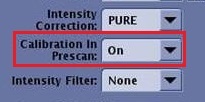
Select On from the Calibration in Prescan menu to automatically acquire a calibration scan as part of Auto Prescan.
- This auto calibration uses a 3D calibration technique: 3D axial Fast SPGR PSD with a small flip angle and short TE. The 3D calibration scan has the following benefits:
- It minimizes susceptibility artifact.
- It minimizes fat/water signal cancellation due to a TE that is close to the out-of-phase TE.
- It minimizes residual aliasing from ASSET that is due to misregistration (motion) between calibration and accelerated acquisitions.
- The AutoView displays Calibration... during the acquisition of the calibration scan.
Figure 2. AutoViewer and calibration scan 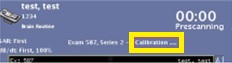
- No calibration images appear in the AutoViewer and the calibration series is not displayed in the Patient List.
- PURE images cannot be generated from ClariView and therefore, if you want a data set without the PURE filter, then you must select Save Original option on the Details page.
- If the series does not have HyperBand, ASSET or PURE in the scan prescription, no calibration scan is acquired during prescan.
- Auto Prescan will skip the calibration scan if suitable calibration data already exists within the exam.
- Auto Prescan acquires new calibration data if no suitable data is available, for example, you have changed the coil, coil group, scan location, landmark, patient position, etc.
Select Off from the Calibration in Prescan menu to manually acquire a calibration scan. If HyperBand, ASSET or PURE parameters are included in the series prescription, the following occurs:
- An Attention message displays informing you that no valid calibration scan is prescribed. Respond to the message.
- A calibration series is automatically added to the Workflow Manager. This series must be acquired prior to the scan with HyperBand, ASSET or PURE.
Figure 3. Calibration series added to Workflow Manager 
- When the calibration scan is acquired, the calibration images appear in the AutoViewer and the calibration series appears in the Patient List.
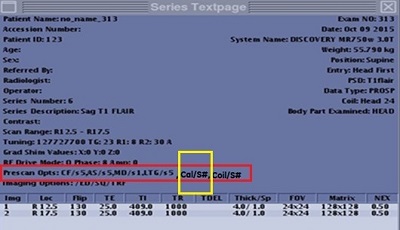
- The calibration series number is displayed on the Series Text page.
Figure 4. Prescan line on Series text page display Calibration series #