

- 00000018WIA308CE870GYZ
- id_400249981.4
- Aug 16, 2022 5:15:14 PM
Real Time Field Adjustment
The Real Time Field Adjustment option is only available with DW-EPI scans and DW-EPI scans with Tensor selected as the Diffusion direction.
Diffusion Weighted Imaging (DWI) and Diffusion Tensor Imaging (DTI) images often experience diffusion direction dependent distortions due to eddy currents generated by the diffusion gradients. These eddy currents can cause misregistration among diffusion-weighted images and inaccuracies in the subsequent data processing. The Real Time Field Adjustment (RTFA) option reduces image distortion and misregistration by applying the following:
- a prospective correction at data acquisition
- a retrospective correction at image reconstruction
- Real Time Field Adjustment appears for DWI and DTI scan prescriptions.
Figure 1. Example of Real Time Field Adjustment scan parameter NOT selected 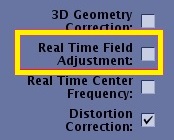
- RTFA is compatible when Dual Spin Echo option (located on the Diffusion tab) is off and when multi-group is not prescribed. Therefore, it is not compatible if Dual Spin Echo is on or when multi-group is prescribed. It is recommended to select the RTFA option when Dual Spin Echo option is off.
- RTFA is compatible with the Integrated Reference Scan option and Excitation Mode: Focus.
- For DTI acquisitions, when Excitation Mode selection of Focus is off, RTFA and Dual Spin Echo cannot both be turned off.
- RTFA requires the High Order Eddy Currents (HOEC) calibration. HOEC is a service tool and thus executed by the service engineer through the normal service procedures. If HOEC is not calibrated but RTFA option is selected, a message displays informing you that the Real Time Field Adjustment is not available and to contact your service engineer. Respond to the prompt.
If large background voids occur (due to large correction applied as a results of, e.g., very large FOV and slice coverage and/or large field offset), turn off the RTFA option.
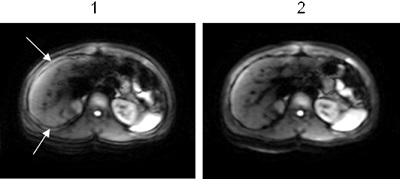
| Number | Description |
|---|---|
| 1 | Image acquired with Real Time Field Adjustment option turned Off. The arrows indicate the area of misregistration. |
| 2 | Image acquired with Real Time Field Adjustment option turned On. |
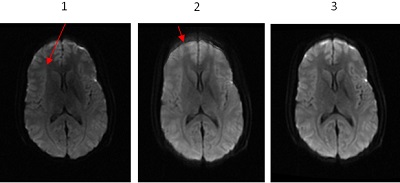
| Number | Description |
|---|---|
| 1 | Image acquired with Dual Spin Echo option On. Note: the reduced SNR due to the TE penalty associated with Dual Spin Echo. |
| 2 | Diffusion tab: Dual Spin Echo option is Off. Scan Details screen: Real Time Field Adjustment option is Off . Note: the increased SNR but misregistration. |
| 3 | Diffusion tab: Dual Spin Echo is Off . Scan Details screen: Real Time Field Adjustment option is On. Note: the increased SNR and minimal misregistration. |