

- 00000018WIA304DE870GYZ
- id_400261591.1
- Jan 2, 2022 12:49:08 PM
Slices and slabs
# Slices

The start and end locations determine the number of slices. The maximum number of slices available is determined by the TR, TE, TI, SAR, and gradient stress.
You can create different slice groups for parallel, oblique, radial, 2D, 3D MRS, 3D, Tracker, and SAT acquisitions.
# Slabs
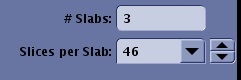
Multi-slab and multi-group are available for all 3D acquisitions.
Slices per Slab
The number of slices that are in one slab. The Total # Slices displayed in the Advisory area is the Slab # x Slices per slab #. For example, 3 slabs with 24 slices per slab is a total of 72 slices.
General considerations
Select a Number of Slices or Slices per Slab to be acquired in the scan prescription.
- A limited number of slices can be acquired in a given scan time. If too many slices are prescribed, the system automatically increases the number of acquisitions. Scan time increases accordingly. Your options are to:
- Accept the longer scan time.
- Increase the TR, shorten the TE, or reduce the SAT pulses. However, these choices may prevent the desired tissue contrast.
- Switch from an oblique to an orthogonal plane.
- Enter a smaller scanning range to reduce the number of slices.
- Increase the FOV.
- Increase the slice thickness or spacing to get the same coverage with fewer slices.
- For localizer acquisitions, select a number of slices for each scan plane. The number of slices can be unique for each plane or the same value for each plane.
- Increase the Slices per slab and the SNR, scan time, and range of coverage increase.