

- 00000018WIA3027D770GYZ
- id_400256211.5
- Aug 16, 2022 1:22:55 PM
No Phase Wrap
To acquire an image with a smaller Field Of View (FOV) than the anatomy in the phase direction and without wrap artifacts, select a No Phase Wrap value from the Scan Parameters screen.
When No Phase Wrap is set to a value greater than 1.0, the scanner collects a proportionally larger FOV in the phase direction and then crops the image back to the prescribed Phase FOV during reconstruction.
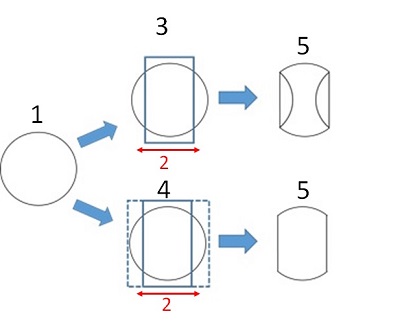
| Number | Description |
|---|---|
| 1 | Scanned object. |
| 2 | Phase direction. |
| 3 | Scan FOV with No Phase Wrap value set to 1 and a FOV smaller than the anatomy in the phase direction. The result is the anatomy outside the FOV wraps into the image. |
| 4 | When a No Phase Wrap factor greater than 1.0 is selected and the Show No Phase Wrap option is selected from the Graphic Rx Tools menu, the extent of the No Phase Wrap is displayed with dotted lines. This provides a visual guide so that you can select a factor that extends larger than the anatomy. The Show No Phase Wrap state is retained between exams and system reboots. 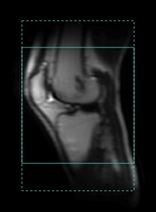 |
| 5 | MR image. |
- Consider linking the No Phase Wrap value across different series.
- Cover the anatomy outside the FOV in the phase direction to avoid the wrap artifact.
- If it is not possible to cover the entire anatomy in the phase direction, for example in a sagittal spine or sagittal knee scans, turn on the Show Coil Extents Graphic Rx option to visualize the coil sensitivity profile or signal drop off in the localizer images. The No Phase Wrap extent should be large enough to cover the coil sensitivity profile.
- Larger No Phase Wrap values increase scan time. Consider a larger FOV with a smaller No Phase Wrap value to balance scan time.
- A No Phase Wrap value larger than 1 may improve the image quality of scans acquired with Autocalibrating Reconstruction for Cartesian imaging (ARC) Imaging Option, particularly with FOVs that are close to the size of the anatomy being scanned.
- When the No Phase Wrap value is greater than 1, there is a slight increase in SNR due to more noise averaging.
- A No Phase Wrap greater than 1.0 is not compatible with Array Spatial Sensitivity Encoding Technique (ASSET).
- No Phase Wrap is annotated as “NP” followed by the selected value, for example: NP1.5.