

- 00000018WIA3091F870GYZ
- id_400216691.14
- Aug 14, 2022 6:06:04 PM
AIRTM Recon DL
About this task
AIRTM Recon DL is a deep learning based reconstruction technique that is available for use on GE Healthcare 1.5T, 3.0T, and 7.0T MR systems. AIRTM Recon DL reduces noise and ringing (truncation artifacts) in MR images, which can be used to reduce scan time and improve image quality.AIRTM Recon DL is intended for use with all anatomies, and for patients of all ages. Depending on the anatomy of interest being imaged, contrast agents may be used.
AIRTM Recon DL is used to:
- Improve SNR
- Sharpen images
- Reduce ringing artifact
- Reduce scan time
- Shorter scan times can be achieved through a variety of means, including, but not limited to, reduction in the number of excitations (NEX), increase in Receive Bandwidth (RBw) , and/or increase in parallel imaging factor for ARC or ASSET.
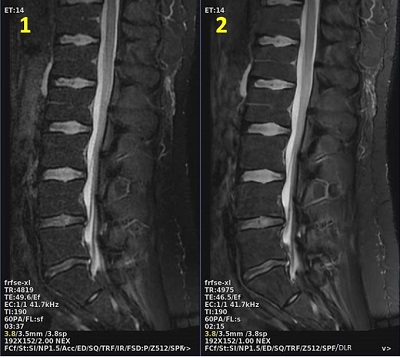
| Number | Description |
|---|---|
| 1 | AIRTM Recon DL turned off. Scan time = 3:37 |
| 2 | AIRTM Recon DL turned on. Scan time = 2:15, scan parameters adjusted to reduce scan time |
AIRTM Recon DL images are annotated with DLR. The Recon DL Strength level is in the DICOM header and on the Series Text screen.
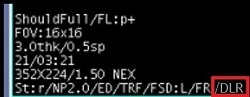
AIRTM Recon DL images with Imaging Options ZIP 512 or ZIP 1024 enabled can further improve image quality.
Intensity filters are not compatible with AIRTM Recon DL.
For 3D acquisitions: The greater the matrix size and the number of phases, the more likely the reconstruction time is affected.
Use of quantitative post processing applications with AIRTM Recon DL images may result in different values than conventional images due to the reduced image noise, particularly when using applications employing noise dependent algorithms.
- For example, due to the reduced noise power of AIRTM Recon DL, image segmentation post-processing routines that use signal intensity threshold values based on noise metrics such as standard deviation, (for example mean + 2*SD), may give different segmentation results when compared to AIRTM Recon DL turned off. Alternate threshold settings such as FWHM may be preferred instead.
For dynamic time sensitive scans, consider acquiring an AIRTM Recon DL series prior to the contrast injection series. The purpose is to evaluate the image quality before you inject contrast.
ProcedureUse these steps to select an AIRTM Recon DL scan parameter.
Step-by-step instructions
- From the Scan Parameters screen menu bar, click the
 of the Scan Parameter screen to open the Details tab.
 - From the Details tab, click the Recon DL Strength arrow and select an option from the menu: Off, Low, Medium or High.
- The Recon DL Strength value represents the level of enhancement that will be applied to the images.
Recon DL Strength value Description Off The AIRTM Recon DL algorithm is not used, and the images are reconstructed using the conventional reconstruction methods. Low The AIRTM Recon DL algorithm is used. Mild denoising is applied and ringing is fully removed. Medium The AIRTM Recon DL algorithm is used. Moderate denoising is applied and ringing is fully removed. High The AIRTM Recon DL algorithm is used. The highest level of denoising is applied and ringing is fully removed. - The Recon DL Strength option on the Details page does not appear unless it is compatible with the selected PSD and Imaging Options.
Figure 3. Details tab with Recon DL Strength option 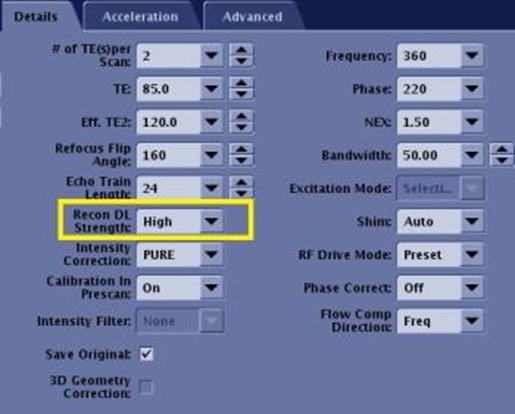
Figure 4. Recon DL Strength variation 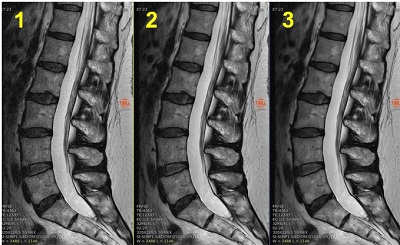
Table 2. Image legend Number Description: Recon DL Strength 1 Low 2 Medium 3 High
- The Recon DL Strength value represents the level of enhancement that will be applied to the images.