

- 00000018WIA30E0F870GYZ
- id_400214671.4
- Aug 14, 2022 5:36:17 PM
3D Geometry Correction
3D Geometry Correction applies a gradient position error correction in 3 dimensions and is available with asymmetric FOVs. It is for use with large FOVs and off-center FOVs to improve image quality.
| Warning | |
|---|---|
- Scan prescriptions with a slice gap larger than 10% of the slice thickness if selecting Spine related anatomy, Spine related anatomy, FSE family PSDs, and sagittal-oblique scan plane
- Scan prescriptions with gaps between slices except for the above conditions
- Scan prescriptions with a single slice
- Radial slice prescriptions
- Multi-group, multi-angle slice prescriptions
- It is not available with PROPELLER
If 3D Geometry Correction is turned off, a conventional 2D gradwarp is applied.
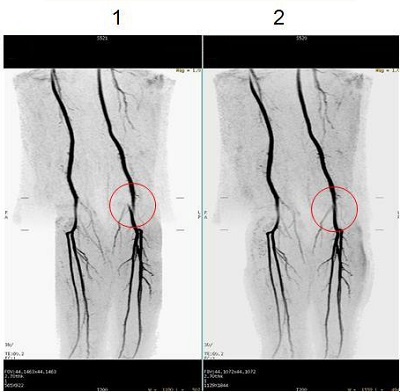
| Number | Description |
|---|---|
| 1 | Image acquired with 3D Geometry Correction Off. |
| 2 | Image acquired with 3D Geometry Correction On. |
The example below shows images at the edge of the volume acquired with 3D Geometry Correction turned On. Portions of the image display as blank due to the through-plane correction, which is expected behavior. The pattern and amount of the image which is blank can vary depending on the position of the acquired volume
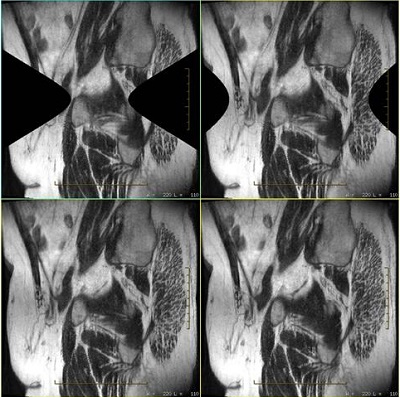
If the prescription (PSD and imaging options) are not compatible, then the selection is not available.
Images are annotated with a w to indicate 3D Geometry Correction was selected.
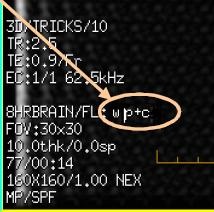
3D geometry correction tradeoffs
- Maximum number of slices per acquisition is reduced.
- Scan reconstruction time is increased.