• Object ID: 00000018WIA303D4970GYZ
  • Topic ID: id_40024894 Version: 1.3
  • Date: Aug 21, 2022 3:47:49 PM

PROPELLER scan parameters selections

Consider this information when modifying the scan parameters for all types of PROPELLER scans. For specific scan parameter values, select a protocol from your GE or Site library.

Typically use PROPELLER to acquire brain, spine, liver, pelvis, shoulder, knee and wrist images.
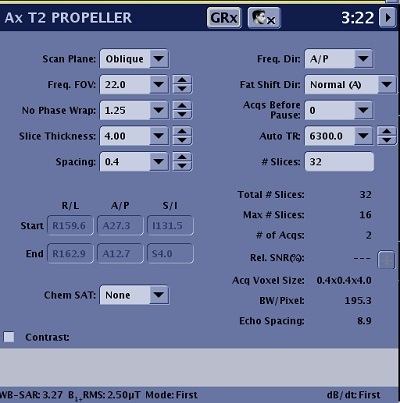
Figure 1. Example of a Scan Parameters screen

Scan Parameters

Consider the following information when selecting PROPELLER scan parameters. Note that not all options are available with every PROPELLER PSD. If the option or scan parameter is not available, it does not appear on the screen.

Imaging Options

Table 1. Scan parameters
ParameterDescription
Scan PlaneFor details, see Scan Plane
Anatomical RegionFor details, see Anatomical Region for tasks.
Calibration in PrescanFor details, see Calibration scan procedure.
No Phase Wrap
  • No Phase Wrap is annotated as: NWF.
  • No Wrap Factor is symmetric over sampling in both the Phase and Frequency directions. In the Phase direction the benefit is No Phase Wrap.
  • For non-axial planes, it is recommended to reduce phase wrap. Typically use a factor of 1.4 or greater. As the factor increases, scan time may increase but phase wrap and fine line artifacts are reduced. Too large of a factor can reduce fine line artifact but may introduce image streaking. It is critical to find the optimum value that produces the best image quality. When applicable, please refer to GE protocols for recommended value.
  • Effective NEX = (NEX value) x (No Wrap Phase Factor)
  • If the No Wrap Factor > 1 and the scan time increases, reduce the NEX value (minimum NEX is 1.5). This can reduce the scan time and may keep the SNR constant since No Wrap Phase Factor increases SNR.
SpacingFor details, see Slice Spacing.
Start/EndDefines the start and end locations in three planes: Superior/Inferior, Right/Left, Anterior/Posterior.
Chem Sat (Chemical Saturation)
  • Select Classic fat saturation for musculoskeletal scans.
  • Select fat saturation for brain and liver scans.
  • SPECIAL and ASPIR are compatible with PROPELLER.
  • For more details on chemical saturation, see Prescribe a chemical SAT pulse.
Freq Dir (Frequency Direction)For details, see Frequency Direction.
Fat Shift Dir (Fat Shift Direction)It used to define the display direction from fat signal. For details, see Fat shift direction.
Acqs Before Pause (Acquisitions Before Pause)For details, see Pause before scan.
TR and Auto TR
  • Typically, keep the TR value the same as a similar FSE protocol.
  • Auto TR is not recommended for all applications. When it is selected, the TR field is not available and thus you cannot manually adjust the TR. Similar to FSE, always check the TR to make sure it is not too low or too high to produce the desired image contrast.
  • The algorithm for Auto TR calculations is the same between PROPELLER and FSE.
  • For details, see TR and Use TR Auto.
# SlicesThe number of slices in a scan prescription.
# of TEs per ScanIt is the number of TE that can be acquired per acquisition. It is frequently referred to as number of echoes.
TE
  • PROPELLER supports a type in TE field. If there is no TE value, type a specific value in the TE text field on the Details tab.
  • For T2 and PD contrast, a recommended TE is 20ms or longer based on the TE used with a similar FSE protocol.
  • For T1 contrast, a recommended TE is less than 30ms.
TI and

Auto Inv. Time (Auto Inversion Time)

  • To manually select a TI value, turn off Auto TR and Auto TI.
Refocus Flip AngleAdjusting the Refocus Angle is typically applied to any musculoskeletal scans. Reducing the flip angle results in increased signal from cartilage. Adjust the refocus angle based on the desired image contrast. As the value decreases, the fluid signal becomes darker. Consider these refocus angles:
  • 1.5T brain T2-weighted contrast = 160
  • Musculoskeletal = 80. This value, for proton density-weighted contrast, produces the maximum cartilage signal and brighter muscle signal.
  • For T1 FLAIR details, see T1 FLAIR.
Echo Train LengthAs the ETL increases:
  • The number of slices per acquisition decreases.
  • TE increases, typically, the shortest TE is desirable.
  • Blade width increases, typically, the highest blade width is desirable.
Intensity CorrectionFor details, see Intensity Filter and Intensity Correction.
Save OriginalFor details, see Save Original.
3D Geometry CorrectionFor details see, 3D Geometry Correction.
Harmonize
  • Harmonize is used when you anticipate that the patient will experience gross motion during the acquisition, for example a patient that is very disoriented and cannot hold still or a patient who has Parkinson's disease.
  • Only turn on Harmonize for brain scans.
FrequencyFor details see Phase and frequency.
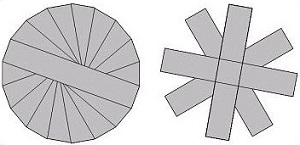
NEX
  • SNR is proportional to (No Wrap Phase Factor) x (NEX).
  • The minimum value for NEX is 1.5 so that reconstructed images are free of undersampling artifacts.
    Figure 2. PROPELLER k-space: 1.5 NEX or greater (left) and NEX less than 1.5 (right)
Bandwidth
  • Bandwidth affects the TE and SNR. If the TE changes minimally (less than 2 ms), as you change the BW, then use the smaller BW value to gain SNR.
  • Typically, adjust the scan parameters to achieve a 50 kHz BW.
Excitation ModeFor details see Excitation Mode.
ShimSelect the Shim value to Auto or On. For details, see: Shim volume
RF Drive ModeFor details, see RF Drive Mode.
Phase CorrectFor details, see Phase Correct.