It is recommended that you select a PROPELLER protocol from your site or GE library. If you choose to build one from a template, from the GE library > Template tab, select the desired PROPELLER series and modify the scan parameters.
A shim volume can be prescribed from graphic Rx. For details, see Shim volume.
Scan selections: 2D Mode, Fast Spin Echo family, PROPELLER pulse.
Select Imaging Option Fast Recovery that results in similar T2 image contrast as an FRFSE-XL scan.
Select Imaging Option IR Prepared that results in similar T2 image contrast as an FSE-IR scan.
Brain applications
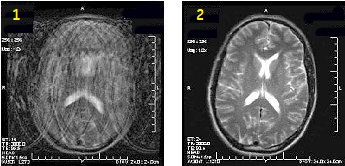
Use PROPELLER to significantly reduce patient motion artifact due to the oversampling of k-space center. The oversampling allows for checking raw data inconsistencies and performing motion correction to the reconstruction process. The result is high SNR and CNR with a slight resolution loss, and reduced motion artifact. It improves SNR and CNR compared to traditional FSE with comparable scan time and it reduces motion artifact.
Figure 1. Motion reduction comparison
Table 1. Image legend
Number
Description
1
FSE image
2
PROPELLER T2 image
To avoid phase wrap artifacts from patient anatomy outside the FOV when using small FOVs, set the No Phase Wrap value to > 1.0.
Select ARC Imagin Options to lower the ETL and TE and to reduce T2 decay related artifacts.
Select a No Wrap Factor of 2.0 or less with oblique planes.
To reduce phase wrap artifacts when using a small FOV, use an No Wrap Factor factor greater than 1.
The TE value cannot be changed because it is determined by the frequency, ETL, and bandwidth values.
TR is typically 6000 to minimize T1 effects and to accommodate the number of slices.
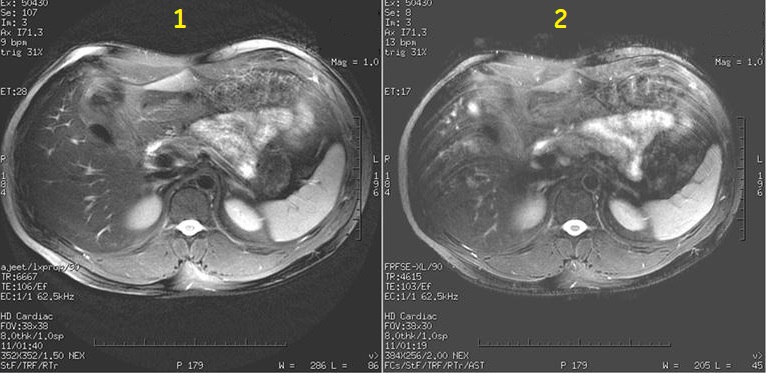
PROPELLER produces T1 and T2-weighted, free-breathing abdominal scans (for example liver and pelvis) for patients with irregular breathing patterns. It also reduces flow and other motion artifacts.
Figure 2. Motion reduction Image comparison
Table 2. Image legend
Number
Description
1
PROPELLER image
2
FSE image
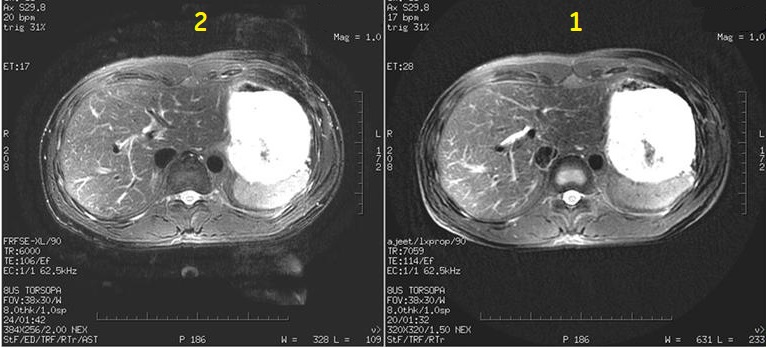
Figure 3. Flow artifact image comparison
Table 3. Image legend
Number
Description
1
PROPELLER with ARC image
2
FSE with ASSET image
Images are annotated Body T2/Prop.
Select ARC Imaging Option to reduce T2 decay, streaking and scan time. Acceleration (ARC) is available with all scan planes.
Select Respiratory Triggering Imaging Option to reduce motion artifact.
Musculoskeletal applications
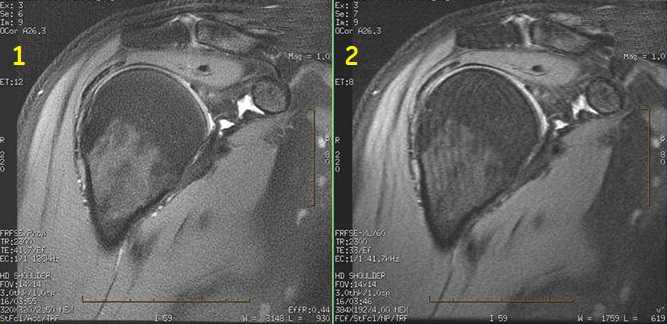
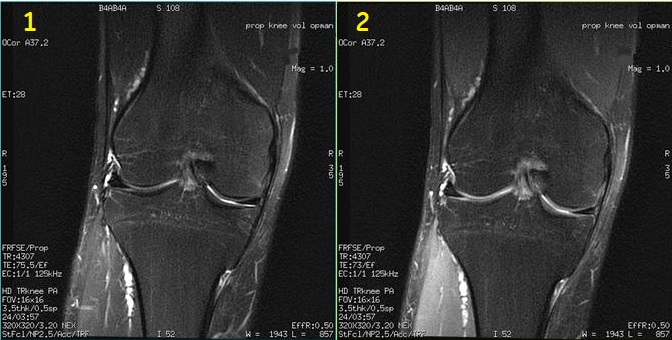
Typically use PROPELLER to acquire PD, T1 and T2-contrast weighted shoulder, knee and wrist images. It is critical for optimum image quality to place the wrist above the head at magnet isocenter. Voluntary or involuntary (for example, breathing motion on shoulders) is minimized in comparison to FSE scans.
Figure 4. Motion reduction shoulder comparison
Table 4. Image legend
Number
Description
1
PROPELLER image
2
FSE image
See Shim volume for details on applying a shim volume to an off-center PROPELLER scan.
Images are annotated Prop.
Select ARC Imaging Option to reduce scan time. Acceleration (ARC) is available with all scan planes.
Select Acceleration factor 4 for 32-channel coils.
Select a No Phase Wrap value sufficiently large, air-to-air coverage, if possible, particularly when ARC is on for to reduce image wrap.
For non-axial planes, it is recommended to use No Wrap Factor located on the Details tab to reduce phase wrap. Typically use a factor of 1.4 or greater. As the factor increases, scan time may increase but image quality improves. Too large of a factor can reduce fine line artifact but introduce image streaking. It is critical to find the optimum value that produces the best image quality.
Modify the flip angle to produce increased signal from cartilage. Typically use a 80° flip angle. Figure 5. Two PROPELLER images comparing cartilage signal intensity
Table 5. Image legend
Number
Description
1
160° flip angle
2
80° flip angle that demonstrates increased signal from cartilage
User CVs
Click the Advance tab to view the available User CVs. The CVs may vary based on the field strength and selected scan and imaging parameters.