

- 00000018WIA30FEE870GYZ
- id_400234471.2
- Aug 21, 2022 3:30:54 PM
PROPELLER T2 FLAIR scan
PROPELLER with T2 FLAIR can significantly reduce patient motion artifact due to the oversampling of k-space center. The oversampling allows for checking raw data inconsistencies and performing motion correction to the reconstruction process. PROPELLER T2 FLAIR imaging provides robust T2-weighted imaging with CSF suppression. When CSF is suppressed, you get better visualization of gray and white matter.
PROPELLER T2 FLAIR reduces patient motion artifact compared to traditional T2 FLAIR with comparable scan time.
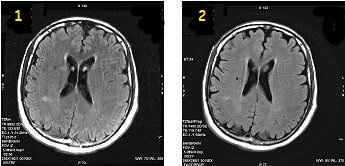
| Number | Description |
|---|---|
| 1 | FLAIR 2:56 |
| 2 | PROPELLER T2 FLAIR 3:27 |
Consider this information when modifying a PROPELLER T2 FLAIR scan parameters. For specific scan parameter values, select a protocol from your GE or Site library.
- Scan selections: 2D Mode, Fast Spin Echo family, PROPELLER pulse, T2 FLAIR Imaging Option.
General
- It is recommended that you select a PROPELLER protocol from your site or GE library. If you choose to build one from a template, from the tab, select the desired PROPELLER series and modify the scan parameters.
- When acquiring a PROPELLER T2 FLAIR scan and phase wrap appears on the image, a subtle dark ring artifact may appear in the anatomy. Re-scan the images with a larger FOV or center the anatomy exactly in the center of the FOV to eliminate the phase wrap which will eliminate the ring artifact.
Scan Parameters
- Auto TI: When Auto TR is selected with T2 FLAIR PROPELLER, Auto TI becomes unavailable for selection and the TI values automatically set to values that null the CSF signal.
- No Phase Wrap: Select a Factor of 2.0 or less with oblique planes.
- To reduce phase wrap artifacts when using a small FOV, use a No Phase Wrap factor greater than 1.
- TE: The TE value cannot be changed because it is determined by the frequency, ETL, and bandwidth values.
- TR: The TR is typically 8000 + (4 times the TI time) to minimize T1 effects and to accommodate the number of slices.
Imaging Options
ARC: Select it to lower the ETL and TE and to reduce T2 decay related artifacts.