RF Drive Mode allows you to choose between a Quadrature (CP) or elliptically polarized B1 field. This adapts the transmit field shape to compensate for inhomogeneities induced by the patient body dielectric effects.
It is designed to improve image homogeneity and thus improve image quality. The RF Drive Mode is selected from the Details screen. To view the Details screen, click the arrow in the upper right corner () of the Scan Parameter screen.
Figure 1. RF Drive Mode menu
Warning
Due to the strong magnetic field disturbance in a region containing metal, do not use the RF Drive Mode parameter: Optimized.
Warning
The tests commonly employed to determine MR Conditional implant heating safety (standard, ASTM F2182, ASTM.org), require quadrature excitation. Heating results for non-quadrature excitation (such as parallel transmit, MultiDrive, or elliptical drive) are unknown. For patients with MR Conditional implants or devices, applying Preset or Optimized RF Drive Modes may violate the MR Conditional specifications.
Table 1. RF Drive mode selections
RF Drive mode
Head (body coil transmit, head coil receive)
Body
Quadrature (CP)
Recommended when scanning patients with MR Conditional metal implants or devices.
Recommended when scanning patients with MR Conditional metal implants or devices.
Preset
Recommended for brain scans.
Recommended for body scans.
Optimizer
Available for brain scans.
Available
Quadrature (CP) and Preset modes do not allow adjustment of the Manual prescan RF Drive Settings values.
Optimizer mode allows adjustment of the Manual prescan RF Drive Settings values.
Attenuation and phase delay prescan values are optimized for the Optimize mode and the values can be edited. Quadrature (CP) and Preset modes use fixed values and cannot be edited.
When used in Optimize mode, manual prescan allows you to adjust the attenuation and phase delay within some maximum range (similar to TG, R1 and R2).
Preset mode is the default mode for most scans. There are some instances where only quadrature is allowed.
From the RF Drive Mode menu (), select Quadrature (CP) when scanning patients with MR Conditional metal implants or devices.
The RF Drive Mode option only applies to the body transmit coil and not to any other transmit/receive coils such as the TR Split Head, TR Knee or TR Wrist coils. The body transmit coil can be combined with any receive coil.
The RF Drive Mode can be saved in your protocol.
The RF Drive Mode and the phase and amplitude values are annotated on the Series text page:


 ) of the Scan Parameter screen.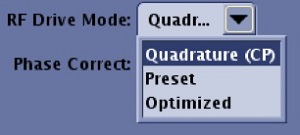
 ), select Quadrature (CP) when scanning patients with MR Conditional metal implants or devices.