- 00000018WIA30CDE870GYZ
- id_400247041.5
- Apr 13, 2022 3:33:59 PM
TI
TI (Inversion Time) primarily controls the contrast in an Inversion Recovery pulse sequence. It is the time between the first (180°) inverting pulse and the middle of the second (90°) refocusing pulse. TI may also be labeled Inv Time or Prep Time, which is based on the selected pulse sequence. Regardless of the name, it defines the time from the alpha to the inversion pulse.
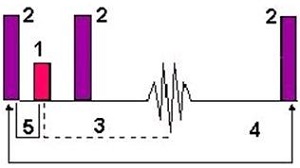
| Number | Description |
|---|---|
| 1 | 90° |
| 2 | 180° |
| 3 | TE |
| 4 | TR |
| 5 | TI |
Select a TI time for Inversion Recovery pulse sequences or other PSDs that require an inversion pulse. Note that the scan parameter name may change based on the PSD.
Auto TI
Auto TI is only available with FSE and PROPELLER when the following imaging options are selected:
- T1 FLAIR
- T2 FLAIR
Under some conditions, the TI value is not selectable and a default value is applied.
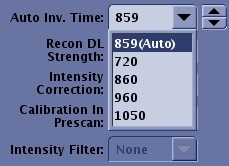
From the Inversion Time menu, select Auto. As you change other scan parameters, the Auto TI value is adjusted to provide the optimum TI for the scan prescription. Once you select Auto, the screen parameter name changes to indicate that Auto is selected and the Inversion Time value is displayed in the text field.
Recovery Time
The Recovery Time is available with Silenz and BRAVO/MP-RAGE application. You can either type in a value or select a value from the menu. Hover the mouse over the field to view the minimum and maximum values. For details, see BRAVO: scan procedure and MP-RAGE scan procedure.
For more details, see Recovery Time.