

- 00000018WIA30B0D770GYZ
- id_400245841.3
- Apr 5, 2022 3:52:40 PM
Patient Orientation
Click the arrows on the Patient Orientation icon (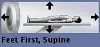 ) and click the arrows to select an entry that matches the patient’s orientation in the magnet.
- If the patient position and entry do not match the patient’s orientation, the R, L, A, P, S, I image annotation will be incorrect.
- The orientation of the Patient Orientation icon reflects your choice. Make sure the icon matches the actual patient orientation.
| Warning | |
|---|---|