

- 00000018WIA30B4A870GYZ
- id_400227071.8
- Aug 19, 2022 5:20:30 PM
FRFSE scan
The fast recovery feature in FRFSE is designed to enhance the intensity of fluids that have long T2 relaxation times, while using a shortened TR time. The shortened TR time makes the high resolution images practical. SNR is improved using FRFSE in comparison to FSE.
The basis of an FRFSE sequence is that the transverse magnetization is still present at the end of the echo train. The magnetization is refocused back into the longitudinal axis by applying a -90° pulse, during the time when normal refocusing is occurring.
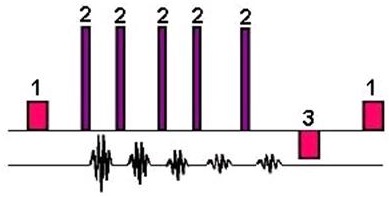
| Number | Description |
|---|---|
| 1 | 90° |
| 2 | 180° |
| 3 | -90° |
Use FRFSE to acquire PD- and T2-weighted acquisitions of the spine, abdominal breath hold images, and head and joint images.
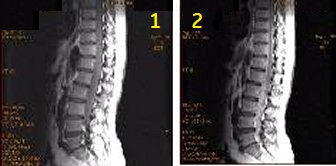
| Number | Description |
|---|---|
| 1 | FSE scan time 4:17, TR = 1833, Eff TE = 12 |
| 2 | FRFSE scan time = 4:29, TR = 1917, Eff TE = 12 |
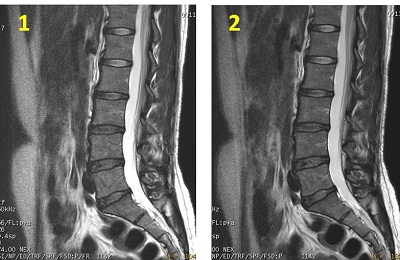
| Number | Description |
|---|---|
| 1 | FSE scan time = 4:17, TR = 1833, Eff TE = 12 |
| 2 | FRFSE scan time = 4:29, TR = 1917, Eff TE = 12 |
Consider this information when modifying FRFSE scan parameters. For specific scan parameter values, select a protocol from your GE or Site library.
2D FRFSE scan parameters
- Scan selections: 2D Mode, Fast Spin Echo family, FSE pulse, Fast Recovery and Tailored RF Imaging Option.
- Acqs before Pause: It must be set to 1 to enable breath hold slice ordering. This allows a pause between groups of slices.
- FOV: If the FOV is ≤ 16 and the slice thickness is ≤ 5, then the echo spacing may increase and there may be fewer slices per acquisition.
- NEX: If an odd NEX is selected, it may (although unlikely), result in reduced spatial resolution in comparison to the same scan parameters with an even NEX.
- SAT: For axial acquisitions, both S and I SAT pulses should be selected in order to place a group of SAT bands at the limits of each group of slices. SAT bands should also be concatenated.
- Slices: It is recommended to move the second group to overlap with the first group of slices. Do not define two groups of slices by clicking and dragging once only—this results in uneven contrast throughout the group of slices.
- Slices: When a dual acquisition is prescribed, the slices are acquired in a sequential, (group 1 = 1,2,3,4; group 2 = 5,6,7,8) rather than an interleaved, (group 1 = 1,3,5,7; group 2 = 2,4,6,8) manner to help reduce mis-registration problems with breath hold scans.
- TE: Select an effective TE that is close to the midpoint of the TE Min/Max range to minimize FSE blurring.
- TR: It is reduced in comparison to FSE at no expense to CNR.
Imaging Options
- Flex: It enables a water-fat separation technique that can be used in place of conventional fat saturation to produce water-only images.
3D FRFSE-XL scan parameters
- Scan selections: 3D Mode, Fast Spin Echo family, FRFSE-XL pulse.
- If either the Torso or Torso Phase Array coil is selected, then ASSET can be used.
- 1 echo, TE, and ETL are automatically selected.
- Bandwidth: The typical RBw value is 31.25 kHz. As the bandwidth increases, minimum TR and TE values may decrease.
- Excitation Mode: Consider selecting Excitation Mode: Focus to reduce phase alias artifact when a small FOV is used.
-
Note: Focus is sensitive to B0 inhomogeneities and thus placement of a local shim box around the region of interest is highly recommended to achieve better image quality.
- When Focus is selected, the Phase FOV (on the scan parameter screen) can have a factor from 0.2 to 0.9.
-
- NEX: Half-NEX is generally used to reduce scan times.
- Phase/Frequency: For high resolution matrix values, for example a frequency matrix value of 512, the echo space increases. The combined effect of a higher echo space results in a significant increase in TE. Note that TE is not directly selected, but rather it is determined by several scan parameters, including frequency matrix value.
- Slabs: They are acquired in an interleaved fashion when the Number of Slabs does not equal the Number of Acquisitions.
- TR: It is not programmable if Respiratory Gating is turned on.
Imaging Options
- T2 Prep: Consider using T2-Prep combined with MRCP Imaging Option to increase TE and improve T2 contrast.
- Respiratory Triggering: The Respiratory Interval text box for the Respiratory Triggering Imaging Option does not allow type-in values with the single-shot view ordering scheme, or in other words, the only available value is 1 RR.
User CVs
Click the Advance tab to view the available User CVs. The CVs may vary based on the field strength and selected scan and imaging parameters.
- Acquisition order
- Select an Acquisition Order if more than 1 group of slices is graphically prescribed. Sequential is a MSMG acquisition and Interleave is a MSMA . MSMG prescriptions take longer than MSMA prescriptions.
- Apodization Level
- Blurring cancellation
- Select Blurring Cancellation for abdominal breath hold scans and to reduce edge blurring. Use a NEX value greater than or equal to 1 if the No Phase Wrap value is greater than 1.0. Use an odd ETL and make the Eff TE the mid-point of the echo train. It allows the use of 100 mm slice thickness. This slice thickness can be useful when performing MRCP sequences.
- Dynamic TG only with neuro 3.0T scans when the # Slices > 1
- Enhanced fine line suppression
- Extreme High Resolution Optimization
- Fast Single TR Bipolar Acquisition
- It is available when Flex Imaging Option is selected.
- Fat Saturation Efficiency
- Half NEX Enhancement
- Use it when NEX value = 0.5.
- Motion Sensitivity Reduction
- PURE Compensation
- SAR Optimization
- Slice Partial Fourier
- Spatial SAT Type
- TR Range for Auto TR, for details see Auto TR.