

- 00000018WIA3076B770GYZ
- id_400267541.4
- Aug 19, 2022 4:46:55 PM
Cube DIR scan
Cube DIR (double inversion recovery) is a single slab, 3D FSE pulse sequence that incorporates two inversion recovery pulses to achieve signal suppression of different tissues. It is used to acquire images with minimized or null signal from either white or grey matter, CSF, and fat.
Use Cube DIR (double inversion recovery) to acquire images with minimized or null signal from either white or grey matter, CSF, and fat.
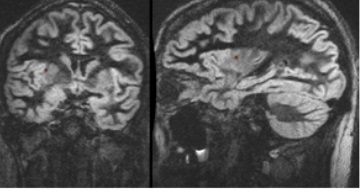
Consider this information when modifying Cube DIR scan parameters. For specific scan parameter values, select a protocol from your GE or Site library.
| Warning | |
|---|---|
- Scan selections: 3D Mode, Fast Spin Echo family, Cube DIR pulse, Extended Dynamic Range, IR Prepared, T2 Prep and PROMO Imaging Options.
General considerations
- Cube DIR only allows a single slab to be deposited in Graphic Rx.
- Typical scan time is 5-7 minutes.
- Signal shading may be caused by B1 non-uniformity.
- Cube DIR is a brain application for improved white matter lesion conspicuity.
Scan parameters
- Excitation Mode: Consider selecting Focus to reduce phase alias artifact when a small FOV is used.
-
Note: Focus is sensitive to B0 inhomogeneities and thus placement of a local shim box around the region of interest is highly recommended to achieve better image quality.
- When Focus is selected, the Phase FOV (on the scan parameter screen) can have a factor from 0.2 to 1.0.
-
- Plane: Axial scan plane is not allowed and thus sagittal, coronal and oblique are the only valid scan planes.
- TI: Cube DIR applies inversion recovery pulses to achieve signal suppression from two different tissues. There are three IR scan parameters on the Details screen.
- Tissue T1 options: White Matter, Grey Matter or a number you enter in the text field.
- Inv. Time: Enter a value or select Auto. Auto Inv. Time is the time the system calculates to suppress CSF. It changes as TR changes.
- TI2: enter a value to suppress the second tissue.
- Auto precedes the TI or TI2 scan parameter if it is selected from the pull-down menu. The default Auto value for the TI times can be set from the Cube DIR User CV.
- If both or either TI and TI2 are set to Auto, then the values are calculated based on internal T1CSF and TissueT1.
- If both TI and TI2 are NOT set to Auto, then Tissue T1 is not selectable (grayed out).
Figure 2. Cube DIR scan Details: IR Auto selected 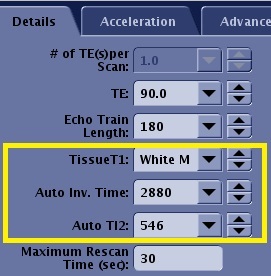
Image annotation
- The PSD annotation is Cube DIR.
- Both the Inv. Time and the TI2 time are annotation, for example, TI:1900/450.
Imaging Options
ARC, EDR, IR Prep, ZIP considerations and PROMO are compatible imaging options.
Post-process tasks
There are multiple compatible post-process tasks. For details, see Add post-process task.