

- 00000018WIA30397970GYZ
- id_400224481.2
- Dec 29, 2021 10:04:36 AM
Active annotation fields
There are three annotation fields that are orange/yellow text indicating that they can be activated.
- Window width and level annotation
- Right-click the orange or active W/L to view a predefine preference menu.
Figure 1. Preference menu 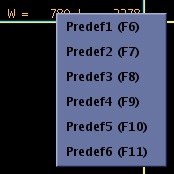
- Right-click the orange or active W/L to view a predefine preference menu.
- Exam, series, Image number annotation
- Left-click the active image/series number annotation to increment the image/series and right-click the image/series number to decrement the images.
- The exam can only be incremented or decremented if there is more than one exam in the DataSelector for the active patient.
Figure 2. Active image number 
- Magnification factor annotation
- Right-click the active magnification text to open a zoom slider.
Figure 3. Zoom slider 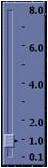
- Right-click the active magnification text to open a zoom slider.