About this task
Use these steps to stop or pause/resume a scan session.Step-by-step instructions
- To pause and resume a scan session, follow these steps.
- From auxiliary keys on the system keyboard, press Pause to temporarily stop the scan.
- Press Start Scan to resume scanning after a pause.
- To stop a scan, can stop a scan, from auxiliary keys on the system keyboard, press Stop Scan.
Scan data is not saved or reconstructed.
Figure 1. System keyboard auxiliary keys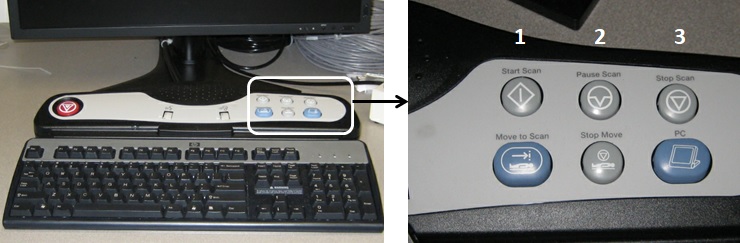
Table 1. Image legend| Number | Selection | Description |
|---|
| 1 | Start Scan | Resumes scanning after pause or breath hold techniques. |
| 2 | Pause Scan | Stops the scan temporarily. |
| 3 | Stop Scan | Aborts a scan or prescan. Scan data is not saved or reconstructed. |

