

- 00000018WIA30E0B770GYZ
- id_400267181.2
- Feb 7, 2022 11:19:14 AM
Scan with Auto Protocol Optimization
About this task
Note: Auto Protocol Optimization supports abdominal Anatomical Regions.
Step-by-step instructions
- From the
 , click
  .
.- The button is activated once all parameters are filled and the Save Rx button is activated.
- From the Auto Protocol Optimization screen, review the content of each button and click the option that best meets the clinical needs.
Figure 1. Example of an Auto Protocol Optimization screen 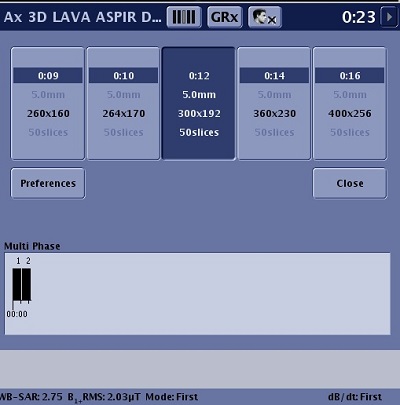
- The middle button represents the original parameters of the protocol.
- Optimized scan parameters vary based on the application and the scan mode. For details, see Base conditions that enable Auto Protocol Optimization.
- The contents of the buttons change when you alter the GRx prescription, coil, parameters on the Auto Protocol Optimization Preferences screen, close and open the Auto Protocol Optimization screen, etc.