Use these steps to scan the same series in the exam.
Step-by-step instructions
In the Workflow Manager, select a series that is in the ACT or DONE state.
Click Scan.
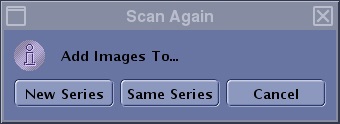
From the Scan Again screen, choose one of the following:
Figure 1. Scan Again screen
Click New Series to add a new series to the Workflow Manager with the same scan parameter and series description. This new series is in an ACT state.
Click Same Series to scan the same area and add the images to the original series.
Click Cancel to not create a new series or scan again.
The Scan Again screen only displays once for any given series. Therefore, if a series in the DONE state, it is selected again, and you click Scan and the last selection from the Scan Again screen is executed.
If you select Prep Scan, and then Scan again immediately after a task has been scanned (without scanning any other task), the pop-up displays the following options: