

- 00000018WIA302FC770GYZ
- id_400252121.3
- Mar 22, 2022 3:32:52 PM
End a scan session
About this task
- Performed Procedure Step (PPS) provides a mechanism to pass information about the MR exam back to the RIS and/or PACS. The billing information is embedded in the end exam action and sent to the site PPS server for the Billing information. Note that the PPS billing option requires a working PPS server from the MR facility side. Multiple error messages are created if the PPS option key is installed without a properly configured facility PPS server. If not using a facility PPS server, it is recommended to uninstall the PPS option key.
- If your system has the PPS (Performed Procedure Step) option and End Exam is selected, the PPS End Exam screen displays. Make a selection from the End Exam menu and click Accept to accept your selection and to close the PPS End Exam screen.
Figure 1. PPS End Exam screen 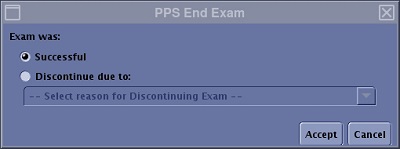
- If you select Discontinue from the PPS End Exam screen, it requires a selection from the pull-down menu.
Figure 2. Discontinue menu 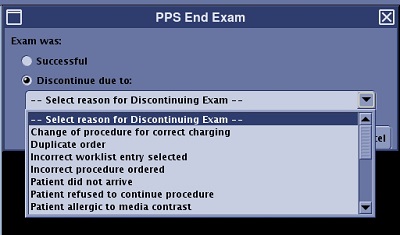
- If you select Discontinue from the PPS End Exam screen, it requires a selection from the pull-down menu.
Use these steps to close a scan session when the exam is not acquiring scan data.
Step-by-step instructions
- To end a scan session follow one of these steps.
- From the Scan Session tab, click the arrow to display the menu.
Figure 3. Scan Session tab 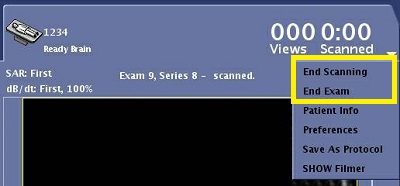
- From the Workflow Manager, click End to view the End menu.
Figure 4. Workflow Manager End menu 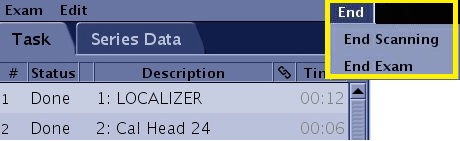
- Menu items that end the scan or end the session are not available until reconstruction is completed.
- If a post-processing task is active and End Scan or End Exam are selected, a message prompt displays warning that you must close the post processing task before ending the scan session.
- From the Scan Session tab, click the arrow to display the menu.
- Choose one of the following:
- Select End Scanning to release the scanning resource so another scan session can start.
- The session tab remains in the header area. Ending scanning allows you to view and post-process the images.
- There can be one scan done sessions. A maximums of two workflow sessions (active/scan-done) are allowed.
- Select End Exam to release the scanning resource and end the session. Respond to any prompts.
Result
The session tab is removed from the header.
- Select End Scanning to release the scanning resource so another scan session can start.