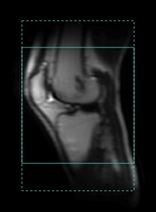
Use these steps to toggle on/off the No Phase Wrap FOV size on the graphic Rx viewport. The No Phase Wrap FOV size is set from the Scan Parameter screen, No Phase Wrap option. For details, see No Phase Wrap.
Step-by-step instructions
From the Graphic Rx toolbar, click the .
From the Graphic Rx Tools menu, click the Show No Phase Wrap check box.
Result
The edges of the expanded FOV determined by the No Phase Wrap value are displayed as dotted lines. Figure 1. No Phase Wrap option active
To remove the dotted lines, click Hide No Phase Wrap. It is a toggle feature.


 .
.