About this task
Use these steps to turn on/off the Report Cursor on all Graphic Rx viewports.Step-by-step instructions
- From the Graphic Rx Toolbar, click the
 .
.
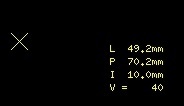
- A yellow cross-hair cursor displays on all Graphic Rx viewports.
- RAS cursor coordinates and the pixel signal intensity display in yellow text in the lower-right corner of each viewport.
Figure 1. Report Cursor tool
- Place the cursor over the Report Cursor cross-hair and click and drag to move it to a new location.
The cursor coordinates and pixel signal intensity display update.
- From the Graphics Rx toolbar, click the again to turn it off. It is a toggle feature.

