About this task AIR TouchTM is an auto coil select feature, which means that your MR system automatically selects the coil elements that are currently connected to your system that will best cover the slices graphically prescribed from a 3-plane localizer. In brief, below is an overview of the scan workflow with auto coil select.
Step-by-step instructions Position the patient on the MR table. Connect the coils to the appropriate coil ports.
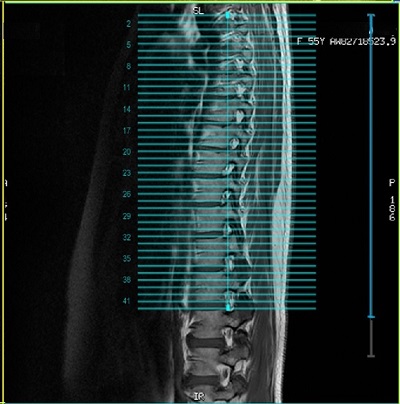
Establish a patient landmark. Select the patient from the schedule or enter the patient from the Worklist Manager and select a protocol. If the connected coils match the coils in the protocol, then prescribe the 3-plane localizer. Acquire the 3-plane localizer. Select the first diagnostic series from the Workflow Manager and complete the following. Prescribe the FOV. Define the graphic Rx scan locations. Check the coil extent lines to confirm coil coverage of slice locations. The blue lines should encompass the graphic slice lines.
For details, see Coil Extents . Figure 2. Blue coil extent lines cover the graphic slice lines Select subsequent series from the Workflow Manager and scan.
If the scan location and FOV are the same as the previous scan, then the auto coil calibration is not acquired in auto prescan. If a different scan location and FOV are different from the previous scan, a new auto coil calibration is acquired in auto prescan.