

- 00000018WIA30B04970GYZ
- id_400228721.4
- Jun 22, 2022 6:48:24 PM
LAVA scan
LAVA is a 3D Fast SPGR acquisition that automatically uses a Partial Kz filling technique and a segmented SPECIAL technique. The Partial Kz technique applies an asymmetric k-space zero fill in the slice direction followed by a SPECIAL inversion pulse and alpha excitation pulses. This technique of applying a small number of alpha pulses (labeled views per segment) after the inversion pulse results in a limitation of fat recovery and thus better fat suppression. The Partial Kz filling technique results in faster scan times which are critical for liver breath hold acquisitions. The Partial Kz fraction is annotated on the image next to the NEX value.
Use LAVA for abdominal scanning, in particular, liver imaging.
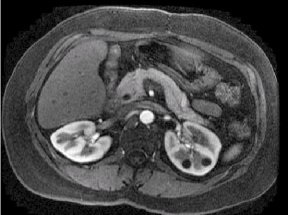
Consider this information when modifying LAVA scan parameters. For specific scan parameter values, select a protocol from your GE or Site library.
- Scan selections: 3D Mode, Gradient Echo family, LAVA pulse.
Scan parameters
- Bandwidth: Modify the default bandwidth. Changing the bandwidth to a lower value increases the scan time.
- No Phase Wrap: For coronal scans, consider using a No Phase Wrap value greater than 1.0, in particular when the patient's arms are at the patient's side rather than overhead.
- SAT: The flip angle used in the SPECIAL pulses is automatically set by the LAVA application so that fat is null when the center of k-space is filled.
- Slab: See the Graphic Rx 3D procedure to review the slice order for orthogonal versus oblique 3D slabs. In general, if you want to rotate your slab to reorder the slices, prescribe an oblique slab.
Imaging Options
- ARC and ASSET: LAVA automatically turns on ARC. If you deselect ARC and select ASSET, you must have acquired a calibration scan prior to acquiring the LAVA scan. If any or all of these scan parameters are selected (ASSET, HyperBand, PURE), and if you select On from the Calibration in Prescan menu, which is located on the Details tab, a calibration scan is acquired during Auto Prescan.
LAVA with Flex Imaging Option scan
LAVA with Flex is a single slab, 3D dual echo Fast SPGR application with Flex Imaging Option. It acquires out-of-phase and in-phase echoes used to generate fat and water images. It uses a two-point Dixon technique. The first out-of-phase and in-phase echoes are acquired within the same TR. To shorten scan time, LAVA with Flex uses a fourier acquisition technique and ARC.
The output series can include: in-phase, out-of-phase, fat only, and water only images.
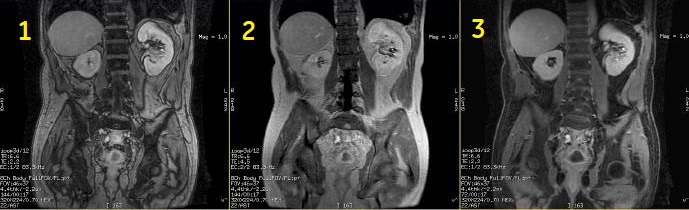
| Number | Description |
|---|---|
| 1 | out-of-phase |
| 2 | in-phase |
| 3 | water only |
Image Annotation
M3D/LAVA/flip angle: Water and Fat images are synthesized from collected in-phase and out-of-phase images; thus TE values for Water and Fat images are the average of IN-phase and Out-of-Phase TEs. In-phase and out-of-phase gets annotated according to the TE and TE2 values on screen.
Display LAVA with Flex Images
| CAUTION | |
|---|---|
User CVs
Click the Advance tab to view the available User CVs. The CVs may vary based on the field strength and selected scan and imaging parameters.
- Apodization Level
- Image acquisition delay
- K-space
- Typically set Centric View Order to 0 to use the default view order.
- Maximum Monitor Period
- Use with SmartPrep Imaging Option.
- NEX Mode
- It is available when a NEX value greater than 1 is selected.
- PURE compensation
- Real Time SAT
- Use with Fluoro Trigger Imaging Option.
- Restricted Real Time Navigation
- Use with Fluoro Trigger Imaging Option.
- Slice Partial Fourier
- Turbo mode