- 00000018WIA30828870GYZ
- id_400243401.10
- Aug 19, 2022 3:21:32 PM
DW EPI
DW EPI is a single shot EPI pulse sequence designed to create images that differentiate tissues with restricted diffusion from tissues with normal diffusion.
Use DW EPI for examining the tissues in the brain, liver, breast and prostate. The Diffusion tab only appears if the protocol has DWI EPI or DW EPI Tensor selected as the pulse sequence.
Consider this information when modifying DWI and DTI scan parameters. For specific scan parameter values, select a protocol from your GE or Site library.
- Scan selections: 2D Mode, Echo Planar Imaging family, DW EPI pulse.
General considerations
- For brain scans, position the patient's head to avoid graphic prescription of double-oblique and in-plane rotation. This can avoid or minimize eyeball artifact.
- Un-scanned b-value diffusion weighted images can be generated from scanned DWI data. For details, see MAGiC DWI (Synthetic DWI) scan procedure. The un-scanned b-value diffusion weighted images can also be generated in Synthetic DWI (accessed from the Session Apps list). For details, see Synthetic DWI workflow.
- epi2alt is a type-in PSD for brain scans that can potentially reduce artifacts from eyeballs. The phase encoding polarity reverse swaps the distortion direction from the default DWI PSD.
- Scan selections: 2D Mode, Echo Planar Imaging family, DW EPI pulse. At the bottom of the expanded Imaging Options/PSD screen, in the PSD Name text field, type epi2alt.
Figure 1. Comparison of epi2alt and default DWI images 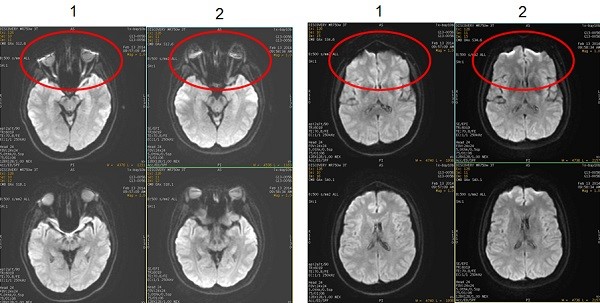
Table 1. Image legend Number Description 1 Images acquired with DWI pulse and type-in: epi2alt 2 Images acquired with the default DWI pulse.
- Scan selections: 2D Mode, Echo Planar Imaging family, DW EPI pulse. At the bottom of the expanded Imaging Options/PSD screen, in the PSD Name text field, type epi2alt.
Scan parameters
- Bandwidth: As the RBw increases, SNR decreases, chemical shift artifact decreases, minimum TE decreases (which means the echo space decreases). As echo space decreases, geometric distortion decreases.
- Excitation Mode: Use Focus with DWI and DTI scans.
- Real Time Field Adjustment: As DW-EPI images are acquired farther away from isocenter, image distortion occurs. A new scan parameter to decrease distortion related gradient eddy currents is located on the Details screen.
- Real Time Center Frequency considerations: Consider selecting Real Time Center Frequency.
- SCENIC is not available with DWI or DTI EPI scans.
- Slice spacing: A negative Spacing value on the Scan Parameter screen is allowed for DWI scans. Consider using multiple acquisitions with a negative Spacing value to minimize cross-talk. Note that negative spacing is not allowed for DTI scans.
- TR: Select a long TR (8,000 to 10,000) to minimize T1 effects and to accommodate the number of slices. TR must be four times longer than the Inversion Time when FLAIR Inversion is selected.
- SPECIAL: use with DWI scan prescriptions. It is also designed to minimize chemical shift artifact, particularly critical at 3.0T. It displays a Prep Time field on the Details page from which you can select Auto TI. The system determines the optimum TI to minimize chemical shift artifact. The maximum number of slices is reduced in comparison to previous software versions that did not have this option. See Prescribe a chemical SAT pulse for more information.
Figure 2. Note reduced chemical shift when SPECIAL is applied to a DWI scan 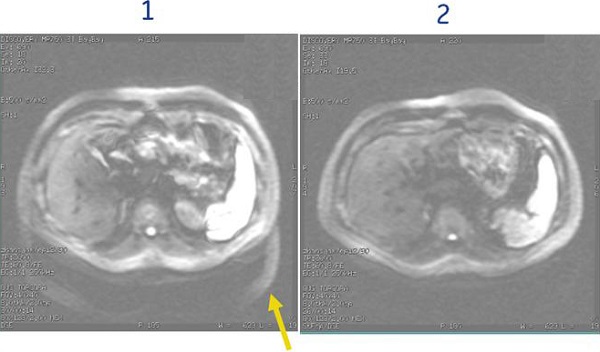
Table 2. Image legend Number Description 1 SPECIAL is turned Off 2 SPECIAL is turned On with Auto TI = 110 ms
Imaging Options
- Respiratory or Cardiac triggering - note they cannot be used together with DWI.
- FLAIR Inversion is not compatible with ASSET.
- IR Prepared is compatible with DWI on these systems:
- 1.5T (approximately 180 ms)
- IR Prepared Imaging Option is used to suppress fat signal typically in the breast and body. Using IR Prepared with DWI produces the most robust fat suppression in comparison to DWI and fat SAT or SPECIAL. The tradeoff for using IR Prepared with DWI is the scan time, which can be as great as three times longer. Therefore, it is typically only used when other fat saturation techniques are not working well or chemical shift artifact needs to be reduced. The TI time is critical for reducing the fat signal. Use these times as a starting point:
- 250 ms
- Auto TI is recommended
Figure 3. DWI breast images 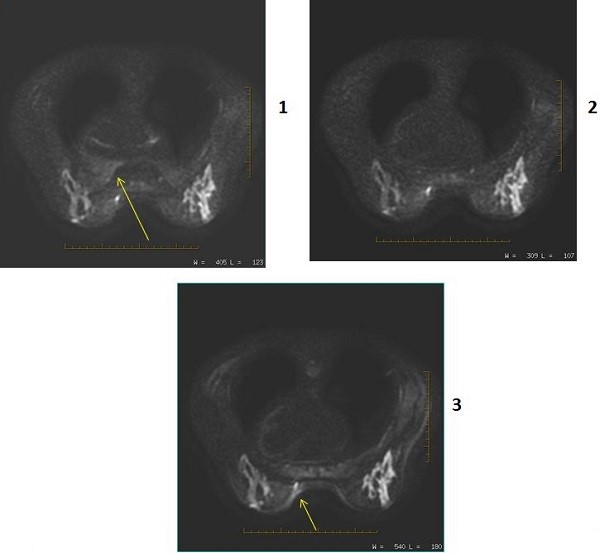
Table 3. Image legend Number Description 1 PSD = DWI Imaging Option = IR Prepared
User CV Enhanced fat suppression = 0 (off)
Note: the chemical shift artifact.2 PSD = DWI Imaging Option = IR Prepared
User CV Enhanced fat suppression = 1 (on)
3 PSD = DWI Imaging Option = None
Image annotation
- B-value is annotated for each image except the T2
- DWI direction is annotated
- NEX value is annotated for each b-value
Figure 4. DWI image annotation 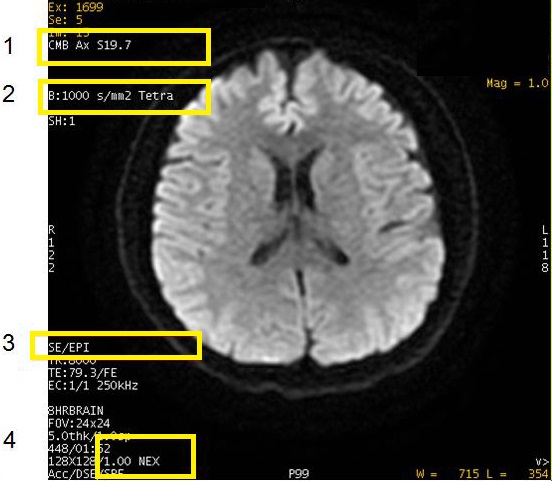
Table 4. Image legend Number Description 1 Diffusion direction: CMB, S/I, Dir 1, T2, etc. 2 b-value. It does not appear on the T2 image. All, or Tetra indicates diffusion directions. 3 PSD 4 NEX
Post-process tasks
There are multiple compatible post-process tasks. For details, see Add post-process task.
- The Diffusion Weighted Imaging (DWI: ADC; eADC) scan post-process task screen allows four selections.
- Threshold setting. For details see Threshold adjustment.
- Confidence level setting. For details, see Confidence level step.
- Kernel size setting. For details, see Kernel size.
- Generation of ADC and eADC maps. For details, see Diffusion Weighted Imaging workflow.
- EPI Correction function. Select to automatically remove distortions by scaling, de-skewing, and translating each image to align it with the reference image. For more details, see EPI correction/ Motion correction.
- For Pasting details, see Scan with Auto Paste.
- The AutoBind scan post-process task allows manual or auto.
- The Image Filter post-process task allows for adding a filter. For details, see Filter or Intensity Correction procedures.
User CVs
- Enhanced fat suppression
- Gradient optimization for Diff All
- PURE compensation
- Ramp Sampling
- Use with single shot and high frequency values decreases geometric distortion.
- Recon Type
- Shim Volume Mode
- STIR Minimum Acquisition
- User CVs new to DWI breast imaging:
- ability to add two shim volumes: Shim Volume Mode
- 3.0T breast imaging selection 2 for Enhanced fat suppression
- TR Range for Auto TR, for details see Use TR Auto.
Diffusion tab
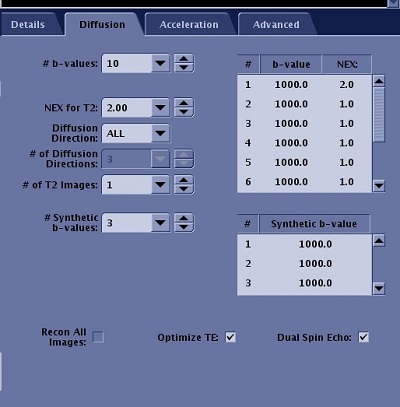
| Parameter | Description |
|---|---|
| b-values | The B-Value indicates the strength and sensitivity of motion probing gradients. As the B-value increases, the sensitivity of the motion probing gradients increases. The maximum B-value for DTI is 4000 s/mm2, the minimum B-value is 10 s/mm2. The text field allows # of b-values to be entered, which are displayed in the table. You can edit the values in the table. |
| NEX for T2 | This allows you to prescribe a unique NEX value for T2 and b-values. Typically use higher values (4-8). |
| Diffusion Direction
| For DTI imaging, you must choose TENSOR for the Diffusion Direction to allow the acquisition to be in tensor mode. Other direction options are not supported for DTI. For DWI, the Diffusion Direction allows you to define the direction of diffusion: All, L/R, A/P, or S/I for orthogonal planes; All or Slice for oblique planes. The diffusion images reflect the motion of water molecules in the selected diffusion direction. 3 in 1 acquires a single direction DWI with three diffusion gradients applied simultaneously. TETRA (tetrahedral) applies three axes simultaneously for each of the four diffusion directions. |
| # of Diffusion Directions | Enter the # of Diffusion Directions for the sequence. The maximum number of diffusion directions is 300, the minimum number is 6. The more directions prescribed, the higher your scan time. |
| # of T2 Images | Enter the # of T2 Images to be collected at the beginning of the acquisition. The maximum number that can be prescribed is 10, the minimum is 1. The recommended number of T2 images is 1. The more T2 images prescribed, the longer the scan time. |
| # of Synthetic b-values | Allows you to synthesize b-value diffusion weighted images using scanned DWI data. MAGiC DWI uses acquired DWI images to synthesize new DWI images with user selected b-values. |
| Recon All Images | Defaults to on and is not de-selectable. |
| Optimize TE | If Optimize TE is Off, the diffusion gradient strength increases as b-value increases. This decreases SNR since the image will have more diffusion weight. When turned off, b-values are limited, gradient duration is fixed, and approximate TE = 100 ms. If Optimize TE is On, maximum gradient amplitudes are employed with the minimum possible TE (based on the b-value), and higher b-values are available. |
| Dual Spin Echo | Turns on an eddy current compensation technique, which reduces distortion. This option increases TE and decreases SNR. It only produces a single echo. For abdominal scans, typically de-select the Dual Spin Echo option, which produces the shortest TE that is needed for bowel gas considerations and also increases SNR. |
b-value
- See Restricted diffusion for Optimum TE details.
- The maximum b-value is 10,000 s/mm2. The maximum b-value may vary depending on the Diffusion Direction selected (3in1 versus TETRA, etc.). Higher b-values may eliminate T2 shine-through, improve visualization of white matter tracks, and therefore be useful in differentiating sub-acute versus chronic infarcts. The strength of the diffusion weight is determined by controlling the strength and duration of diffusion gradients via controlling a quantity called b-value. Multiple b-values can be acquired within a single scan. A CMB image is created for each b-value if it is a Diffusion All or Tetrahedral scan.
- Recommended b-values for abdomen: 500 - 700.
- Recommended b-values for brain: 1000 - 1500.
- For 3in1, TETRA and Grad Opt All, the maximum allowed b-value is 1500.
Figure 7. Varying b-values 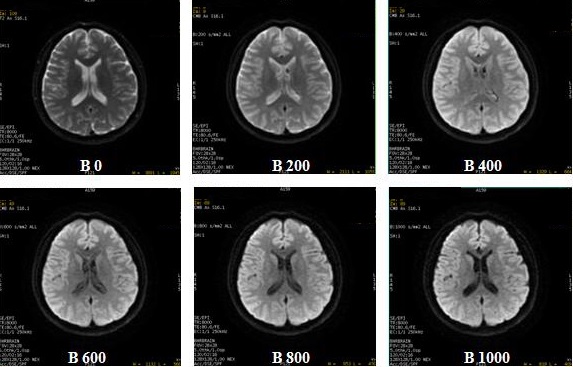
- Multiple b-value is only available with DWI and not with DTI.
- From the Diffusion tab, specify the NEX for each b-value. As NEX increases, SNR increases.
- The T2 image will be skipped when the # of T2 images is set to 0.
- To create ADC maps, more than one b-value has to be specified.
- When you observe black (null) areas in an ADC map acquired with multiple b-values, setting a larger confidence level parameter in DWI Optional procedure may eliminate the null areas. The confidence level can also be selected when adding a post- process DWI task. The confidence level can be saved as part of the protocol's post process task.
Diffusion direction menu
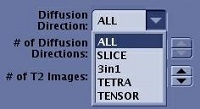
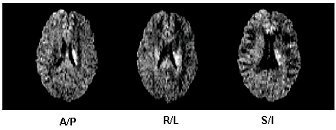
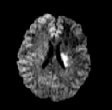
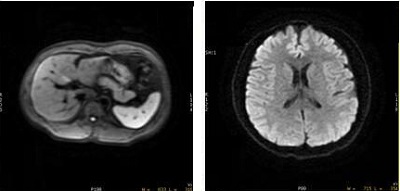
- 3 in 1 acquires single direction DWI with 3 diffusion gradient applied simultaneously. The reduced TE increases the SNR.
- Tetrahedral acquires three axes simultaneously for the each of the four diffusion directions (dir1, dir2, dir3, dir4) resulting in improved SNR.
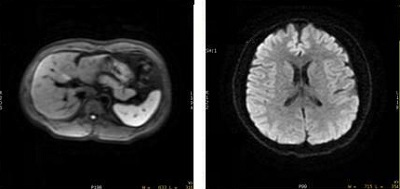
Figure 10. 3 in 1 image on left (abdomen) and Tetrahedral average image on right (head) - The diffusion gradients can be applied in individual directions or in all directions, 3 in 1, TETRA (Tetrahedral) or TENSOR.
- If you change the Diffusion direction and then change scan planes, the system retains parameters on the Diffusion tab.
- When Distortion Correction option box on the Details tab is selected, the number of diffusion directions is 300. For Distortion Correction details, see Distortion Correction.
- When prescribing oblique scans, an increase in TE and therefore reduced image quality results with the following diffusion direction selections:
- ALL plus User CV Gradient Optimization for Diff All set to 1
- 3 in 1
- TETRA
Diffusion details
Restricted diffusion
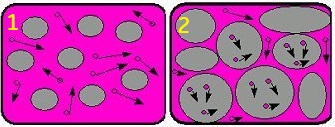
The extra-cellular water in normal brain tissue diffuses freely, resulting in a dark signal. The extra-cellular water in dead brain tissue does not diffuse, resulting in a bright signal.
| Number | Description |
|---|---|
| 1 | Normal diffusion |
| 2 | Restricted diffusion |
- Diffusion selection Recon ALL images is incompatible with Diffusion ALL + Gradient Optimization for Diff All (User CV 7). Recon ALL images selection is only allowed in Research mode.
- Selecting Diffusion Direction All and turning on (set CV to 1) User CV Gradient Optimization for Diff All provides all diffusion directions and decreased TE and a corresponding increased SNR in comparison to the standard All Diffusion Direction option.
- From the Diffusion Option screen, de-select Dual Spin Echo when used with 3in1 Diffusion Direction to acquire abdomen scans.
- 3 in 1 acquires single direction DWI with 3 diffusion gradients (X,Y and Z) applied simultaneously. The diffusion direction is a vector of all three. The reduced TE increases the SNR. Typically use 3 in 1 for liver and other abdominal scans for cancer evaluation. 3 in 1 takes the same scan time as a single direction but includes a directional vector component from all three directions.
Figure 12. 3 in 1 applies three gradient axes simultaneously 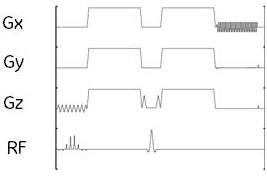
Figure 13. 59.6 ms TE on left and 3 in 1 TE of 51.4 ms improves SNR 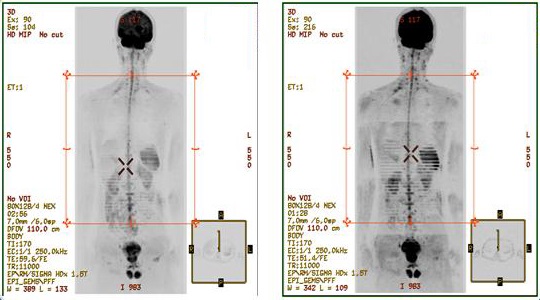 Tetrahedral
- Tetrahedral acquires three axes simultaneously for the each of the four diffusion directions (G1,G2,G3,G4). This results in a reduced TE, which increases SNR due to the increased b-value efficiency. In addition, the CMB image over 4 directions gives further increases SNR. It may also be useful in pediatric brain scans due to the small FOVs and high b-values.
Figure 14. Three axes applied simultaneously for each of four diffusion directions 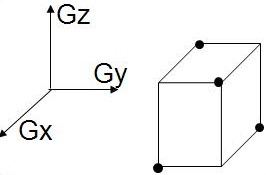
Figure 15. 3 in 1 image on left (abdomen and Tetrahedral average image on right (head)