

- 00000018WIA3086F770GYZ
- id_400238741.3
- Mar 22, 2022 3:28:14 PM
Toolbar: annotate and measure icons
The Measure/Annotate icons provide the ability to perform measurements and annotate images.
The order of the icons on the toolbar are based on your preferences. To customize the icons on the toolbar, see Toolbar preferences: select icons to display on screen.
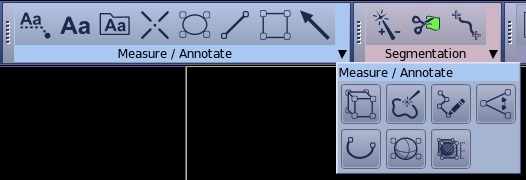
Annotation icons
| Icon | Description/procedure |
|---|---|
 | Link
Use to deposit a line on a viewport, which connects annotation to an area of interest on the image. For details, see Add annotation with a pointer. |
 | Annotation
Use to deposit annotation on a viewport. For details, see Add annotation and Annotations preferences: adjust annotation fields and fonts. |
 | Preset Annotation
Use to create preset annotation text that can be selected from a menu. For details, see Create annotation presets. |
 | Arrow
Use to deposit an arrow on a viewport. For details, see Arrows: deposit, size and position |
Measurement icons
| Icon | Description/procedure |
|---|---|
 | Straight distance
Use to deposit two points on an image(s) to create a distance measurement. For details, see Generate a distance measurement and Remove image graphics |
 | Curved distance
Use to deposit multiple points to create a curved measurement. For details, see: Generate a curved distance measurement |
 | Angle
Use to deposit an angle measurement on a viewport. For details, see: |
 | Volume
Use to deposit a Volume on a viewport. For details, see:Measure a volume. |
Cursor and ROI icons
| Icon | Description/procedure |
|---|---|
 | Report Cursor
Use to deposit a point on the viewports to display a RAS coordinate and the voxel value for the current cursor position. For details, see Report cursor: activate. |
 | Elliptic ROI
Use to deposit a 2D elliptical ROI on a viewport. For details, see: |
 | Rectangular ROI
Use to deposit a 2D rectangular ROI on a viewport. For details, see:Deposit a 2D ROI procedure |
 | Free hand ROI
Use to deposit a 2D free hand ROI on a viewport. For details, see:Deposit a 2D ROI procedure |
 | Auto Contour
Use to deposit a 3D free hand ROI on a viewport. For details see:Deposit a 3D ROI |
 | Sphere ROI
Use to deposit a 3D spherical ROI on a viewport. For details see:Deposit a 3D ROI |
 | 3D box ROI
Use to deposit a 3D box ROI on a viewport. For details see:Deposit a 3D ROI |