

- 00000018WIA3090E870GYZ
- id_400227051.2
- Mar 2, 2022 9:55:15 AM
FastCINE scan
FastCINE is a scan mode that uses a PSD from the GRE family with Cardiac Gating Imaging Option and a value entered for # of phases to reconstruct on the Cardiac tab. The PSD can be a Fast GRE/SPGR or Fiesta acquisition with the # of Cardiac Phases to Reconstruct set to a specific value, typically 20 to 24. It is acquired in the 2D mode and not Cine.
FastCINE allows segmented k-space which allows for short breath-hold scan times. The k-space segmenting technique reconstructs all phase steps regardless of when they are acquired within the cardiac cycle. This allows for complete imaging of the RR interval allowing better visualization of end diastolic events. The variable view sharing technique reconstructs images at different delay times within each cardiac cycle depending on a temporal phase position that varies with the heart rate. It combines the strengths of Fast Card and Cine for shorter scan times and imaging through the cardiac cycle.
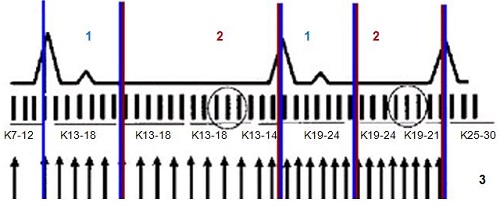
| Number | Description |
|---|---|
| 1 | Systole |
| 2 | Diastole |
| 3 | Phases |
Use FastCINE for:
- cardiac wall motion studies with tagging
- quantitative analysis
- assessment of valve function
- visualization of regurgitation and stenosis
- cardiac function analysis
Consider this information when modifying FastCINE scan parameters. For specific scan parameter values, select a protocol from your GE or Site library.
- Scan selections: 2D mode, Gradient Echo family, Fast GRE or Fast SPGR or Fiesta pulse, Cardiac Gating Imaging Options, Cardiac tab with a value entered for # of phases to reconstruct and Prospective is not selected. This scan mode is often referred to as FastCINE, which performs retrospective reconstruction to provide information over the whole RR interval.
General considerations
- As the Arrhythmia Rejection Window value increases, the number of slices decreases. Do not exceed a value of 50.
- Combined cardiac and respiratory gating is allowed with FastCINE sequences.
- The displayed scan time is calculated according to the prescribed heart rate. Actual scan time may vary from this if the heart rate changes during the scan.
DICOM header information about heart cycle
For 3DCINE-SPGR 3DCINE-FIESTA, 4DFLOW and 2D FastCINE including 2D PC FastCINE scans, the DICOM header contains information about the cardiac cycle variations during scan. This allows a better understanding of the heart rate variation of the patient during the scan and can be used to better interpret the results.
- The heart rate and nominal interval DICOM tags (0018,1088 and 0018,1062) show the mean heart rate/nominal interval during the scan.
- Additionally, the minimum RR interval, the maximum RR interval, the number of rejected segments due to detected arrhythmia, and the total number of acquired segments during the scan, also are included in the DICOM header (Tags: 0018,1081- 0018,1082- 0018, 1084- 0018,1083, respectively).
This information allows a better understanding of the heart rate variation of the patient during the scan and can be used to interpret better the results.
Scan parameters
- Bandwidth: A value up to 125 can be used to acquire faster scans at the expense of SNR.
- TE:
- Minimum Full TE is recommended. However, it is possible to manually enter a TE value when a longer TE is clinically relevant; e.g., when evaluating heart valve jet flow when TE values are typically in the range of 8 to 12 ms.
- As the TE increases, SNR decreases and T2* effects increase. Image quality is NOT guaranteed in FastCINE sequences utilizing high TE values.
- Update Rate: Click it to get the most recent heart rate. Alternatively, use the Projected Heart Rate to set the patient's mean heart rate.
- VPS: The temporal resolution is calculated by VPS × TR.
- It is important for a Cine image that the temporal resolution be kept at 80 to 100 msec.
- Increasing the Views per Segment affects the temporal resolution, and can result in blurry images. As the VPS decreases, the scan time increases.
- VPS recommendations for PC FastCINE:
- BPM ≤ 60, use 8 VPS
- BPM is between 60-95, use 6 VPS
- BPM > 95, use 4 VPS
Imaging Options
- Sequential: Turn it off if you want to acquire a FastCard multi-planar acquisition.
- Flow Compensation: Select it to increase signal from blood.
- Respiratory Triggering: Select it for non-breath hold exams.
User CVs
Click the Advance tab to view the available User CVs. The CVs may vary based on the field strength and selected scan and imaging parameters.
- Apodization Level
- Use with Fiesta.
- Arrhythmia Rejection
- Reduced image quality may result from heart arrhythmias that occur during the scan. To minimize the arrhythmia effects on image quality, consider turning on Arrhythmia Rejection.