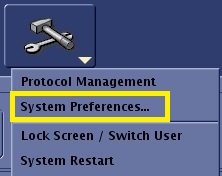
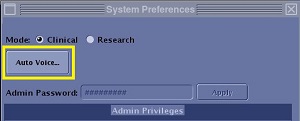
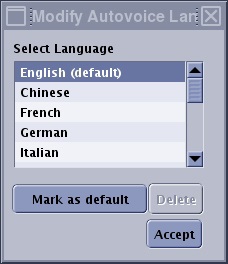
Object ID: 00000018WIA30629870GYZTopic ID: id_40026498 Version: 1.2Date: Feb 7, 2022 2:24:15 PMNew and default language About this taskUse these steps to add a new language to the AutoVoice Language menu.Step-by-step instructionsFrom the Tools menu, select Preferences to open the System Preferences screen. Figure 1. Tools menu From the System Preferences screen, click Auto Voice... to open the AutoVoice Management Tool screen. Figure 2. Top area of System Preferences screen Click Close to close the System Preference screen.From the AutoVoice Management Tool screen, click Options.From the Modify AutoVoice Language menu, select new language at the end of the list. Figure 3. Modify AutoVoice Language screen Type a new entry. The following characters can be placed in the message title and description: [0-9], [a-z], [A-Z], [ !”#$%&’()*+,-./:;<=>?@[\]^_`{|}~]To define any language as the default language that is used for AutoVoice, click Mark as default.Click Accept to close the Modify AutoVoice Language screen.Click Accept to apply the changes and to close the AutoVoice Management Tool screen.