About this task
Use these steps to remove a site message in AutoVoice. A message cannot be deleted if a patient exam is opened or a scan is in progress.Step-by-step instructions
- From the Tools menu, select Preferences to open the System Preferences screen.
Figure 1. Tools menu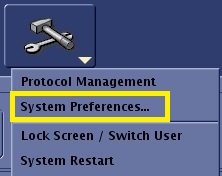
- From the System Preferences screen, click Auto Voice... to open the AutoVoice Management Tool screen.
Figure 2. Top area of System Preferences screen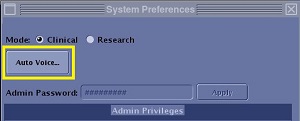
- Click Close to close the System Preference screen.
- From the AutoVoice Management Tool screen, select the message you want to delete from the Site Message list.
- Click Delete.
- Click OK.
- Click Accept to apply the changes and to close the screen.

