- 00000018WIA30097870GYZ
- id_400239531.3
- Mar 25, 2022 4:12:51 PM
Anonymize patient data
About this task
Use these steps to remove certain exam information and replace it with anonymous information.
Considerations
When Full Anonymizing is active, the system changes the following Patient List fields when an exam, series, or image is made to anonymous:
- In the Exam column, the exam reads XXXX/ANON, where XXXX is the exam number.
- The Patient Name is changed to AnonXXXX, where XXXX is the exam number.
- The exam description is changed to Anonymized.
- The series description is changed to Anonymized.
- On the image, the accession number, the birthdate, sex, weight, and age are removed and the hospital name, station name, patient name, and patient ID are changed to Anonymized or Anon/XXXX.
- On the exam and series text page the following content appears blank:
- Referred by
- Radiologist
- Operator
- History
When Partial Anonymous is active, the following fields are made anonymous:
- On the Patient List, the patient name is anonymized.
- On the exam test page, the series text page and the image, patient name, and patient ID are anonymized.
- On the exam text page, series text page and the image the following content appears blank:
- Date of birth
- Accession number
Step-by-step instructions
- From the header area of the screen, click the
 to open the Image Management work area.
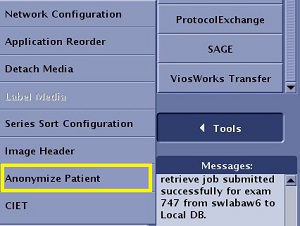
 - Click .
Figure 1. Tools list